<?xml version="1.0" encoding="utf-8"?><feed xmlns="http://www.w3.org/2005/Atom" xml:lang="en-US"><generator uri="https://jekyllrb.com/" version="4.1.1">Jekyll</generator><link href="https://riv.dev/feed.xml" rel="self" type="application/atom+xml" /><link href="https://riv.dev/" rel="alternate" type="text/html" hreflang="en-US" /><updated>2023-12-30T22:14:26-08:00</updated><id>https://riv.dev/feed.xml</id><title type="html">River Gillis [riv.dev]</title><subtitle>This is my personal blog.</subtitle><author><name>River Gillis</name><email>river@riv.dev</email></author><entry><title type="html">Japanese Progress Update 2023</title><link href="https://riv.dev/japanese-progress-update-2023/" rel="alternate" type="text/html" title="Japanese Progress Update 2023" /><published>2023-12-30T00:01:00-08:00</published><updated>2023-12-30T00:01:00-08:00</updated><id>https://riv.dev/japanese-progress-update-2023</id><content type="html" xml:base="https://riv.dev/japanese-progress-update-2023/"><![CDATA[<p><img src="/assets/img/jp-progress-2023-anki.png" alt="Anki screenshot" title="Anki Screenshot" /></p>
<h1 id="context">Context</h1>
<p>I’ve tried a few times to learn Japanese. All of those attempts have ended with me quitting after a few months and feeling pretty bad at it. This year I began a final attempt after I visited Japan and found new motivation. This attempt (the final attempt) began on 3/9/2023 starting from nearly zero (I could remember most of the kana and a few set phrases). This is the first yearly update which documents my experience learning the language this year.</p>

<h1 id="2023-milestones">2023 Milestones</h1>
<ul>
  <li>Completed Genki 1 on 8/18/2023 (took 170 days)</li>
  <li>Completed Tango N5 on 9/4/2023 (took 78 days)</li>
  <li>Completed Genki 2 on 12/30/2023 (took 109 days)</li>
  <li>Learned 1970 new words</li>
</ul>

<h1 id="7523-entry">7/5/23 entry</h1>
<p><strong>Kanji</strong><br />
I began 3/9/2023. I reset my WaniKani level back to 0 from 10, which hurt. It felt like I was finally admitting to myself that I had failed in my last attempt. Level 10 wasn’t even that high, but it was still several hundred kanji that I spent many many hours learning. After I got going again, I realized that I hadn’t really failed, it was only a setback. I may not have remembered every kanji, but I was certainly learning them much faster than last time. As of writing I’m back up to level 8 already.</p>

<p>Apparently this covers 94% of the JLPT numbers, but I’m still having trouble seeing new kanji in the Tango N5 deck I use. Perhaps this is because there seems to be some sort of disconnect between kanji JLPT levels and the JLPT levels for words that use those kanji. For example, the Tango N5 deck contains the word <a href="https://jisho.org/word/%E8%BE%9E%E6%9B%B8">辞書, “dictionary”</a>. I haven’t seen either of those kanji, because 辞 is an N3 level kanji but the entire word is considered N5 level. I don’t fully understand why this disconnect exists yet, maybe I’ll have a better understanding in the future.</p>

<p>Either way, I’m actually attempting to slow down my kanji learning speed. Previously I’ve been doing 10 new lessons per day (and all of the radicals at once). This has been great for learning kanji, but it takes up a lot of time and I feel now that I’m falling behind on grammar. I’ll be moving to 5 new lessons per day in order to give myself more time for Genki.</p>

<p>毎日、漢字を覚えます！</p>

<h1 id="81823-entry">8/18/23 entry</h1>
<p><strong>Grammar</strong><br />
I started with Genki 1 pretty much as soon as I got back from Japan, 3/1/23. I was able to recognize all of the kana after a day or two of re-learning. I signed up for the Seattle Japanese Language school classes, which ran 4/4/23 - 6/6/23. These class covered Genki 1 lessons 3 and 4. During this time, I felt like this progression was too slow for me. I enjoyed getting a chance to speak in class and I think this format probably works well for a lot of people, but I would have preferred a faster format. These classes were primarily useful for making me feel accountable for learning and helping me to form some discipline. I did not study ahead during this time.</p>

<p>After these classes ended, I began working through Genki 1 on my own and at a much faster pace. I completed Genki 1 on 8/18/23, meaning I spent roughly 5.5 months on it. I did the exercises in both the textbook and workbook. Towards the end I felt that writing was slowing me down too much, so I transitioned to using https://sethclydesdale.github.io/genki-study-resources to answer the questions. I did not practice the kanji or study the vocabulary from the textbook, so when I encountered a word I did not recognize I just looked it up in a dictionary.</p>

<p>I noticed towards the end of Genki 1 that exercises would involve lots of grammar points and I wouldn’t always be able to recall them, so I had to look through my notes. Now that I’ve finished working through all of the exercises, I’m planning on adding the grammar points to Bunpro so that I can etch these into my brain via SRS. I tried doing this as I went through Genki 1 but the exercises would use grammar points that I had not encountered yet. I found the casual (short-form) stuff particularly frustrating because I hadn’t gotten to that part of the book yet.</p>

<p>I plan on picking up Genki 2 soon and I’m hoping to finish at around the end of this year.</p>

<p><strong>Vocabulary</strong><br />
I started by using an Anki deck to SRS the Genki 1 vocabulary, but I found that to be frustratingly slow and I think a lot of the words weren’t very useful, so I stopped doing that. On 6/19/23 I started the Tango N5 Anki deck and as of today I’ve got about 270 new cards left. I’m working at a pace of 15 new cards/day which feels about as fast as I can go. I feel like this is significantly more enjoyable than learning vocabulary on WaniKani or through the Genki 1 Anki deck. I feel like the sentence context helps to read the unknown kanji and this process has made me question whether or not it even makes sense to learn kanji in isolation, more on that in the kanji section.</p>

<p>I’m going to continue through the Tango N5 deck and then tackle Tango N4. I have a copy of よつばと！ sitting on a shelf next to me that I’d love to start reading. I don’t think 1000 words is going to cut it though, so I may end up using the Yotsubato! reading pack (https://livingjapanese.com/pages/yotsubato_reading_pack1.html) to help me out. I think I’ll try this in tandem with Tango N4.</p>

<p>I really want to get started consuming native materials ASAP. Lots of folks online recommend anime, but I’m not the biggest fan of it. I’ll probably try it out to see if it helps me learn. I do really like Ghibli movies though, so I want to try to learn enough vocab to watch Totoro. I found jpdb.io which has has a vocabulary deck for the movie that looks promising.</p>

<p><strong>Kanji</strong><br />
I haven’t made much more progress on WaniKani. I do my reviews every day but this is easily the least enjoyable part of my learning. I feel like learning kanji in isolation isn’t helping me nearly as much as just learning the vocabulary directly. I’m going to keep doing my reviews, but I think I’ll put a hold on new lessons for a bit. I don’t want to fall behind, but this feels pretty inefficient and doesn’t motivate me very much.</p>

<p><strong>Listening/Speaking</strong><br />
🙈</p>

<h1 id="9423-entry">9/4/23 entry</h1>
<p><strong>Vocabulary</strong><br />
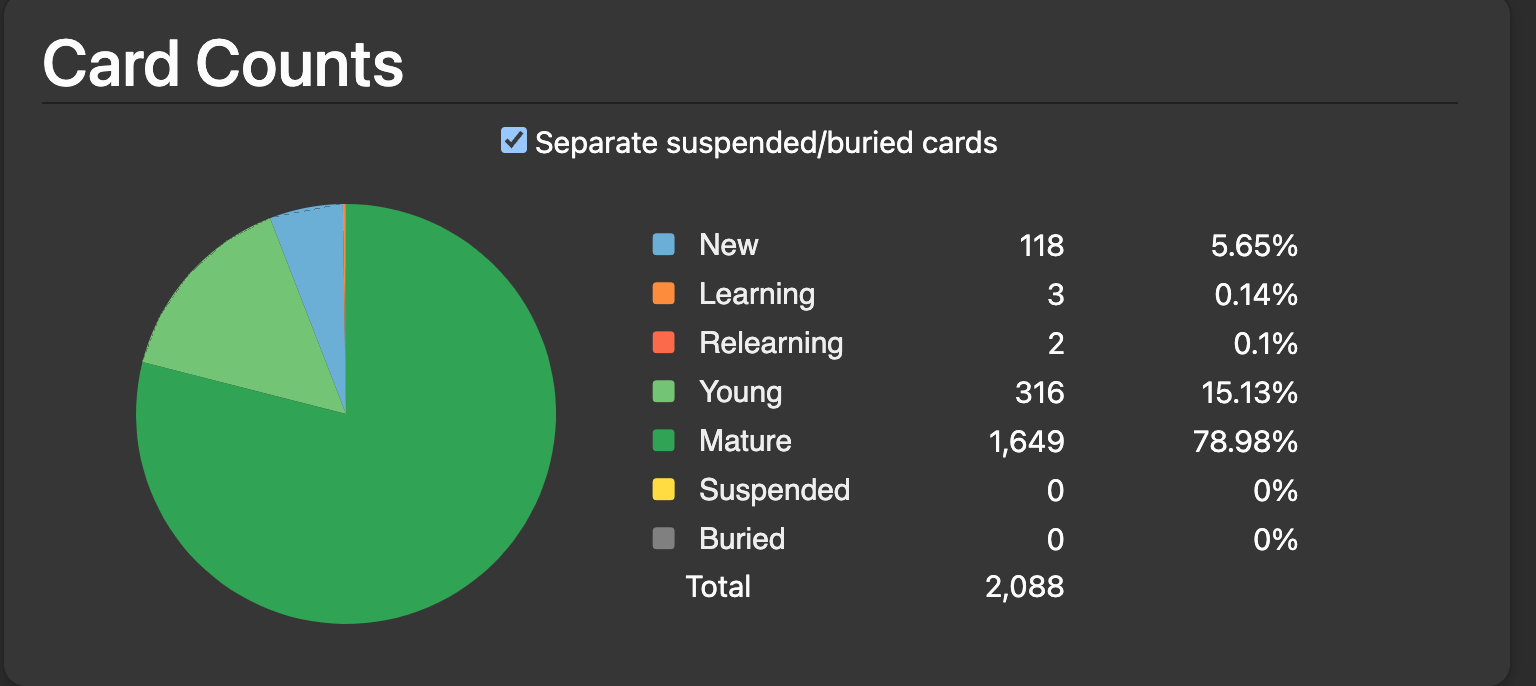
Today I finished the Tango N5 deck! Or, at least I’ve gone through all the new cards. It ended up taking me 78 days. I averaged 25 mins/day and it took about 33 hours in total. I answered a little over 10,000 questions. I feel great having completed it and I’m excited to move on to the N4 stuff! That’s +1171 vocab and with my Wanikani progress I estimate I’m around 1500 vocab. I took a look at Satori Reader yesterday and despite learning soooo many new words every day, I can hardly recognize any words in the beginner stories.</p>

<h1 id="end-of-year-entry">End-of-year entry</h1>
<p><strong>Grammar</strong><br />
I’m wrapping up Genki 2 right now. I’ve got 2 or 3 remaining grammar points to work on and then I’ll have finished Genki! For Genki 2, I read through the grammar point explanations in the book, but instead of working through the book exercises I added the grammar points to my Bunpro SRS reviews and have worked on the reviews for those daily. Each day I’ve added 1 or 2 grammar points, with and exception for a month or two where I did not have much time for learning new material.</p>

<p>As I’ve added more grammar points, I’ve noticed that the examples in Genki have become more difficult as there are more past grammar points that they build on. I think the Bunpro reviews are helping me to retain a lot of this, but I feel like I haven’t really “nailed down” a lot of due to the lack of reading. Since I’m just doing a bunch of SRS exercises, I get exposed to a lot of quizzes but not actual usage of the grammar points which is making me feel like it is difficult to read longer sentences.</p>

<p><strong>Vocabulary</strong><br />
According to Anki, I’ve got about 158 new words left in the Tango N4 deck. As of this writing (12/24/23) I’ve put 1930 words into young/mature. As I started Tango N5 on June 19th that comes out to a little over 10 new words per day. My pace for the N4 deck has been slower at 10 words per day, and I missed about a month of new cards due to time constraints, but I’ve kept up my reviews. I’m looking forward to wrapping up the new cards in this deck so that I can move on to creating my own cards through immersion. The Tango decks are marketed as i+1 on forums online, but I have found that the ordering of these cards is often super weird. I’m seeing cards for words at the end of N4 that showed up midway through N5. I’m also finding that the whole-sentence nature of these cards makes it so that reviews take longer as I’m reading through the entire card and checking against multiple words.</p>

<p>Again I’m worried that the sentence nature of the Tango deck is causing me to remember positions of words rather than the words themselves. I’m hoping that I’m actually learning something here though, and I think that will be put to the test when I move onto word-only cards in January.</p>

<p><strong>Kanji</strong><br />
This is tricky, I haven’t been working on isolated kanji since I stopped WaniKani back in August. I’m not sure if I should pick this back up, as I have been noticing that it is becoming more difficult to differentiate the kanji I’m seeing in words as I add on more known words. This is especially tricky when reading sentences that aren’t part of the Tango decks as I don’t have the “muscle memory” for them.</p>

<p>I’m thinking of picking up isolated kanji learning again to help with this. Perhaps using the Migaku kanji god extension to build kanji cards from my vocabulary cards will make this process easier? I just don’t like using prebuilt decks very much and I don’t think I can make myself do much more WaniKani.</p>

<p><strong>Listening / Speaking</strong><br />
I’ve still not put much practice into this yet. I feel like I’m too far behind everywhere else to get much out of this. Though I have explored using SuperNative.tv a bit. Currently my MMR on the Listen + Recall section is 1614. This seems pretty fun and I think would be useful for boosting my listening skills. I’m a bit lost on figuring out speaking skills without doing an actual conversion though, which sounds very difficult right now.</p>

<p><strong>Immersion</strong><br />
I’ve made some attempts through both Yotsuba and Satori Reader. I found Yotsubato to be more difficult due to the colloquial language preventing me from getting much use out of Yomichan. Additionally I have come to rely on the kanji to help with many words due to the Tango decks, so having to figure out the words from kana alone is difficult. I haven’t made it through more than a few dozen pages and I want to put more effort into this next year (see below goals).</p>

<p>Satori Reader has been much easier. I have read through about 20 episodes now, mostly through 壁の穴. I think the episodes are pretty good on the difficulty, and I have noticed that overwhelmingly most of my troubles come from not knowing the grammar. Having to look up a few words per episode is fine, but I’m noticing there’s a huge rift between knowing how to answer the grammar SRS on Bunpro and being able to actually read real sentences that use the grammar.</p>

<p>Overall immersion has been kind of exhausting. I feel like it will continue to be for a little while until I’ve read enough though, but I plan on powering through it next year and I’m hoping that it will become enjoyable before long. Additionally, immersion will very soon become my main source of vocabulary as I’ll be mining for all future words starting in just a few days.</p>

<h1 id="goals-for-2024">Goals for 2024</h1>
<p><em>Theme: reach N3 level and then some.</em></p>
<ul>
  <li><strong>Learn 1825 new words</strong>
    <ul>
      <li>At 5 words per day, this would bring my total known word count to nearly 4000, which is well beyond the 3000 reported words needed for N3.</li>
    </ul>
  </li>
  <li><strong>Complete Quartet 1 and mature the grammar points in Bunpro</strong>
    <ul>
      <li>This should fulfill the grammar component for N3.</li>
    </ul>
  </li>
  <li><strong>Read 1000 pages of manga in Japanese</strong>
    <ul>
      <li>Assuming I’ll read about about 10 pages/hour. This is 100 hours.</li>
    </ul>
  </li>
  <li><strong>Complete 2 tutoring sessions</strong>
    <ul>
      <li>This is for practicing speaking and listening.</li>
    </ul>
  </li>
</ul>]]></content><author><name>River Gillis</name><email>river@riv.dev</email></author><category term="japanese" /><category term="language" /><category term="learning" /><summary type="html"><![CDATA[My progress update for learning japanese in 2023]]></summary></entry><entry><title type="html">Release – CENTAURI HEAVY INDUSTRIES</title><link href="https://riv.dev/centauri-heavy-industries-release/" rel="alternate" type="text/html" title="Release – CENTAURI HEAVY INDUSTRIES" /><published>2023-05-13T01:01:00-07:00</published><updated>2023-05-13T01:01:00-07:00</updated><id>https://riv.dev/centauri-heavy-industries-release</id><content type="html" xml:base="https://riv.dev/centauri-heavy-industries-release/"><![CDATA[<iframe frameborder="0" src="https://itch.io/embed/2062662?bg_color=1f0d1f&amp;fg_color=ffffff&amp;link_color=961a78&amp;border_color=333333" width="552" height="167"><a href="https://ferm.itch.io/centauri">CENTAURI HEAVY INDUSTRIES by River Gillis</a></iframe>

<h2 id="centauri-heavy-industries">CENTAURI HEAVY INDUSTRIES</h2>
<p>God has crafted you from blood and motor. Your sole purpose is to improve Their mining operation on some long-forgotten planet. <strong>You’ve got 30 minutes till your body crumbles.</strong></p>

<h2 id="about">About</h2>
<p>CENTAURI HEAVY INDUSTRIES is a narrative-driven resource gathering factory simulation game with multiple endings set in the grim darkness of the far future.</p>

<iframe width="420" height="315" src="https://www.youtube.com/embed/nXDn0gC_LHY" frameborder="0" allowfullscreen=""></iframe>

<p><img src="/assets/img/centauri_logo_itch.png" alt="CHI LOGO" title="CHI LOGO" /></p>]]></content><author><name>River Gillis</name><email>river@riv.dev</email></author><category term="games" /><summary type="html"><![CDATA[CENTAURI HEAVY INDUSTRIES game release]]></summary></entry><entry><title type="html">Raytracing Demo</title><link href="https://riv.dev/raytracing-demo/" rel="alternate" type="text/html" title="Raytracing Demo" /><published>2022-01-27T16:11:00-08:00</published><updated>2022-01-27T16:11:00-08:00</updated><id>https://riv.dev/raytracing-demo</id><content type="html" xml:base="https://riv.dev/raytracing-demo/"><![CDATA[<div class="video-wrapper">
  <video muted="" autoplay="" playsinline="" loop="">
      <source src="/assets/img/rt_spheres.webm" type="video/webm" />
      <source src="/assets/img/rt_spheres.mp4" type="video/mp4" />
  </video>
</div>

<p>Recently I’ve been reading through <a href="https://gabrielgambetta.com/computer-graphics-from-scratch/">Computer Graphics from Scratch</a>. The sections on raytracing have been a great refresher for me, and I’ve learned some new tricks.</p>

<p>I’ve written up a <a href="https://github.com/rivergillis/graphics-from-scratch">C++ software raytracer</a> based on the book and now I’ve got an animation to show for it!
The above video combines about 2200 frames that were rendered as <a href="https://github.com/rivergillis/graphics-from-scratch/blob/b825be43fe96eb5ea1924d80dcee82d257da8651/image.cpp#L68">PPM images</a> and stitched together using ffmpeg. Each 900x900 frame takes about 1 second to render on my M1 mac,
 and the renderer streams the images to an SDL2 window as they finish so that I can see the progress. Lowering the quality of the render allows us to get to real-time, but I prefer the look of the reflections.</p>]]></content><author><name>River Gillis</name><email>river@riv.dev</email></author><category term="programming" /><category term="rendering" /><category term="games" /><summary type="html"><![CDATA[A demo video featuring raytraced speheres]]></summary></entry><entry><title type="html">Emulating a Computer: Timing and Input</title><link href="https://riv.dev/emulating-a-computer-part-4/" rel="alternate" type="text/html" title="Emulating a Computer: Timing and Input" /><published>2020-12-08T18:44:00-08:00</published><updated>2020-12-08T18:44:00-08:00</updated><id>https://riv.dev/emulating-a-computer-part-4</id><content type="html" xml:base="https://riv.dev/emulating-a-computer-part-4/"><![CDATA[<div class="video-wrapper">
  <video muted="" autoplay="" playsinline="" loop="">
      <source src="/assets/img/vers.webm" type="video/webm" />
      <source src="/assets/img/vers.mp4" type="video/mp4" />
  </video>
</div>

<p>When <a href="/emulating-a-computer-part-3/">last we left off</a>, we developed a full-featured CHIP-8 emulator. Unfortunately, it is <strong>really</strong> slow. Why is it slow? Well if you look back at the main loop you’ll see that we’re rendering to the screen after every cycle is executed. With vsync enabled, SDL will try to lock rendering to your monitor’s refresh rate (probably 60Hz). What that means is that the <code class="language-plaintext highlighter-rouge">SDLViewer::Update</code> method is going to block for a long time, almost every time it is called, waiting for the monitor vsync to arrive.</p>

<p>So how fast <em>should</em> our emulator execute? Well, that’s tricky to determine exactly. Each opcode has a different execution time in a real computer, though approximate timings are known. We could execute an instruction, lookup how long it <em>should</em> have taken on real hardware, and sleep until we’re ready to go again. The problem with that is that we don’t have access to CPU timings at that resolution. Most of these instructions should take a couple of microseconds, but we can only resonably sleep for <strong>at least</strong> a millisecond on modern systems.</p>

<p>We can, however, amortize it. We know that over the course of a second, an average of 540 operations should execute. This will of course not be the case if every instruction is something complex like a draw, but it will work for real-world programs. We also know that CHIP-8 machines target 60Hz refresh rates. That means that every <code class="language-plaintext highlighter-rouge">540 / 60 = 9</code> instructions our emulated machine ought to wait until the next vsync.</p>

<p>So we ought to be able to alter our own main loop to execute 9 instructions before every call to <code class="language-plaintext highlighter-rouge">SDLViewer::Update</code>. We’d then be exploiting our own diplay’s refresh rate to correct our emulation timings. Let’s give it a shot:</p>

<div class="language-cpp highlighter-rouge"><div class="highlight"><pre class="highlight"><code><span class="c1">// main.cpp</span>

<span class="kt">void</span> <span class="nf">Run</span><span class="p">()</span> <span class="p">{</span>
  <span class="p">...</span>
  <span class="k">while</span> <span class="p">(</span><span class="o">!</span><span class="n">quit</span><span class="p">)</span> <span class="p">{</span>
    <span class="k">for</span> <span class="p">(</span><span class="kt">int</span> <span class="n">i</span> <span class="o">=</span> <span class="mi">0</span><span class="p">;</span> <span class="n">i</span> <span class="o">&lt;</span> <span class="mi">9</span><span class="p">;</span> <span class="n">i</span><span class="o">++</span><span class="p">)</span> <span class="p">{</span>
      <span class="n">cpu</span><span class="p">.</span><span class="n">RunCycle</span><span class="p">();</span>
    <span class="p">}</span>
    <span class="n">cpu</span><span class="p">.</span><span class="n">GetFrame</span><span class="p">()</span><span class="o">-&gt;</span><span class="n">CopyToRGB24</span><span class="p">(</span><span class="n">rgb24</span><span class="p">,</span> <span class="cm">/*r=*/</span><span class="mi">255</span><span class="p">,</span> <span class="cm">/*g=*/</span><span class="mi">0</span><span class="p">,</span> <span class="cm">/*b=*/</span><span class="mi">0</span><span class="p">);</span>
    <span class="n">viewer</span><span class="p">.</span><span class="n">SetFrameRGB24</span><span class="p">(</span><span class="n">rgb24</span><span class="p">,</span> <span class="n">height</span><span class="p">);</span>
    <span class="k">auto</span> <span class="n">events</span> <span class="o">=</span> <span class="n">viewer</span><span class="p">.</span><span class="n">Update</span><span class="p">();</span>
    <span class="p">...</span>
  <span class="p">}</span>
<span class="p">}</span>
</code></pre></div></div>

<p>With that, there’s a pretty good chance that your emulator is now executing 540 operations per second, and is displaying graphics at 60Hz!</p>

<p>There is an issue if you try to run this on a machine using a display with a refresh rate of more than 60Hz, our utilization of our own hardware’s refresh rate is no longer accurate to the emulated machine, causing the emulation to run too fast. If this is an issue for you, you can emulate the vsync as well. You know that the 9 intructions + the render needs to take <code class="language-plaintext highlighter-rouge">1000/60 = 16.67</code> ms, so you can execute those operations, measure how long they take, and sleep as long as necessary. Because that sleep won’t be the most accurate, you can measure the execution time of 540 operations (60 emulated refresh cycles) as well, and sleep up to the second boundary in order to provide any correction to the vsync sleeps. This is exactly what I do in the <a href="https://github.com/rivergillis/chip-8">original version of this emulator</a> that I based these articles on. That project also uses a seperate thread for CPU execution, whish is likely unnessary (but cool).</p>

<p>Now that we’re executing at 540 instructions per second, supporting the CPU timers is pretty easy. The CHIP-8 features two timers, a delay timer and an audio timer. Both of these timers decrement at 60Hz, and the machine beeps while the audio timer is not zero. We can now simply decrement these timers once every 9 instructions in order to emulate a 60Hz clock:</p>

<div class="language-cpp highlighter-rouge"><div class="highlight"><pre class="highlight"><code><span class="c1">// cpu_chip8.cpp</span>

<span class="kt">void</span> <span class="n">CpuChip8</span><span class="o">::</span><span class="n">RunCycle</span><span class="p">()</span> <span class="p">{</span>
  <span class="p">...</span> 
  <span class="c1">// Update timers</span>
  <span class="n">num_cycles_</span><span class="o">++</span><span class="p">;</span>
  <span class="k">if</span> <span class="p">(</span><span class="n">num_cycles_</span> <span class="o">%</span> <span class="mi">9</span> <span class="o">==</span> <span class="mi">0</span><span class="p">)</span> <span class="p">{</span>
    <span class="k">if</span> <span class="p">(</span><span class="n">delay_timer_</span> <span class="o">&gt;</span> <span class="mi">0</span><span class="p">)</span> <span class="n">delay_timer_</span><span class="o">--</span><span class="p">;</span>
    <span class="k">if</span> <span class="p">(</span><span class="n">sound_timer_</span> <span class="o">&gt;</span> <span class="mi">0</span><span class="p">)</span> <span class="p">{</span>
      <span class="n">std</span><span class="o">::</span><span class="n">cout</span> <span class="o">&lt;&lt;</span> <span class="s">"BEEPING"</span> <span class="o">&lt;&lt;</span> <span class="n">std</span><span class="o">::</span><span class="n">endl</span><span class="p">;</span>
      <span class="n">sound_timer_</span><span class="o">--</span><span class="p">;</span>
    <span class="p">}</span>
  <span class="p">}</span>
<span class="p">}</span>
</code></pre></div></div>

<p>One last thing I have yet to mention is input. This is a simple matter of reading the events returned from <code class="language-plaintext highlighter-rouge">SDLViewer::Update</code>. Like I mentioned, the CHIP-8 uses a 16-key keypad, and you can map those to whatever keys you’d like on the keyboard. Here’s a snippet:</p>

<div class="language-cpp highlighter-rouge"><div class="highlight"><pre class="highlight"><code><span class="c1">// main.cpp</span>

<span class="p">...</span>
<span class="k">auto</span> <span class="n">events</span> <span class="o">=</span> <span class="n">viewer</span><span class="p">.</span><span class="n">Update</span><span class="p">();</span>
<span class="kt">uint8_t</span> <span class="n">cpu_keypad</span><span class="p">[</span><span class="mi">16</span><span class="p">];</span>
<span class="k">for</span> <span class="p">(</span><span class="k">const</span> <span class="k">auto</span><span class="o">&amp;</span> <span class="n">e</span> <span class="o">:</span> <span class="n">events</span><span class="p">)</span> <span class="p">{</span>
  <span class="k">if</span> <span class="p">(</span><span class="n">e</span><span class="p">.</span><span class="n">type</span> <span class="o">==</span> <span class="n">SDL_KEYDOWN</span> <span class="o">||</span> <span class="n">e</span><span class="p">.</span><span class="n">type</span> <span class="o">==</span> <span class="n">SDL_KEYUP</span><span class="p">)</span> <span class="p">{</span>
    <span class="k">if</span> <span class="p">(</span><span class="n">e</span><span class="p">.</span><span class="n">key</span><span class="p">.</span><span class="n">keysym</span><span class="p">.</span><span class="n">sym</span> <span class="o">==</span> <span class="n">SDLK_1</span><span class="p">)</span> <span class="p">{</span>                        
      <span class="n">cpu_keypad</span><span class="p">[</span><span class="mi">0</span><span class="p">]</span> <span class="o">=</span> <span class="n">e</span><span class="p">.</span><span class="n">type</span> <span class="o">==</span> <span class="n">SDL_KEYDOWN</span><span class="p">;</span>
    <span class="p">}</span> <span class="k">else</span> <span class="k">if</span> <span class="p">(</span><span class="n">e</span><span class="p">.</span><span class="n">key</span><span class="p">.</span><span class="n">keysym</span><span class="p">.</span><span class="n">sym</span> <span class="o">==</span> <span class="n">SDLK_2</span><span class="p">)</span> <span class="p">{</span>                        
      <span class="n">cpu_keypad</span><span class="p">[</span><span class="mi">1</span><span class="p">]</span> <span class="o">=</span> <span class="n">e</span><span class="p">.</span><span class="n">type</span> <span class="o">==</span> <span class="n">SDL_KEYDOWN</span><span class="p">;</span>
    <span class="p">}</span> <span class="k">else</span> <span class="k">if</span> <span class="p">(</span><span class="n">e</span><span class="p">.</span><span class="n">key</span><span class="p">.</span><span class="n">keysym</span><span class="p">.</span><span class="n">sym</span> <span class="o">==</span> <span class="n">SDLK_3</span><span class="p">)</span> <span class="p">{</span>                        
      <span class="n">cpu_keypad</span><span class="p">[</span><span class="mi">2</span><span class="p">]</span> <span class="o">=</span> <span class="n">e</span><span class="p">.</span><span class="n">type</span> <span class="o">==</span> <span class="n">SDL_KEYDOWN</span><span class="p">;</span>
    <span class="p">}</span> <span class="k">else</span> <span class="k">if</span> <span class="p">(</span><span class="n">e</span><span class="p">.</span><span class="n">key</span><span class="p">.</span><span class="n">keysym</span><span class="p">.</span><span class="n">sym</span> <span class="o">==</span> <span class="n">SDLK_4</span><span class="p">)</span> <span class="p">{</span>                        
      <span class="n">cpu_keypad</span><span class="p">[</span><span class="mi">3</span><span class="p">]</span> <span class="o">=</span> <span class="n">e</span><span class="p">.</span><span class="n">type</span> <span class="o">==</span> <span class="n">SDL_KEYDOWN</span><span class="p">;</span>
    <span class="p">}</span> <span class="k">else</span> <span class="k">if</span> <span class="p">(</span><span class="n">e</span><span class="p">.</span><span class="n">key</span><span class="p">.</span><span class="n">keysym</span><span class="p">.</span><span class="n">sym</span> <span class="o">==</span> <span class="n">SDLK_q</span><span class="p">)</span> <span class="p">{</span>                        
      <span class="n">cpu_keypad</span><span class="p">[</span><span class="mi">4</span><span class="p">]</span> <span class="o">=</span> <span class="n">e</span><span class="p">.</span><span class="n">type</span> <span class="o">==</span> <span class="n">SDL_KEYDOWN</span><span class="p">;</span>
    <span class="p">}</span>
    <span class="p">...</span>
  <span class="p">}</span>
<span class="p">}</span>
<span class="n">cpu</span><span class="p">.</span><span class="n">SetKeypad</span><span class="p">(</span><span class="n">cpu_keypad</span><span class="p">);</span>

<span class="c1">// cpu_chip8.cpp</span>
<span class="kt">void</span> <span class="n">CpuChip8</span><span class="o">::</span><span class="n">SetKeypad</span><span class="p">(</span><span class="kt">uint8_t</span><span class="o">*</span> <span class="n">keys</span><span class="p">)</span> <span class="p">{</span>
  <span class="n">std</span><span class="o">::</span><span class="n">memcpy</span><span class="p">(</span><span class="n">keypad_state_</span><span class="p">,</span> <span class="n">keys</span><span class="p">,</span> <span class="mi">16</span><span class="p">);</span>
<span class="p">}</span>
</code></pre></div></div>

<p>Finally, our emulator is complete. We’ve built a complete CHIP-8 interpreter with support for writing a mono frame buffer, a system for converting that buffer to RGB images that get streamed to the GPU as textures, and have now corrected the timings and hooked up input.</p>

<p>I don’t know about you, but I learned quite a bit from building this project. It felt really good to build something from the ground up and finish it, and this project felt especially good because now I can actually play through these ROMs! With this completed, I’m one step closer to understanding the magic behind <em>Super Mario World</em>.</p>]]></content><author><name>River Gillis</name><email>river@riv.dev</email></author><category term="programming" /><category term="emulation" /><category term="games" /><summary type="html"><![CDATA[Correctly emulating time in a CHIP-8 emualtor.]]></summary></entry><entry><title type="html">Emulating a Computer: Graphics and Texture Streaming</title><link href="https://riv.dev/emulating-a-computer-part-3/" rel="alternate" type="text/html" title="Emulating a Computer: Graphics and Texture Streaming" /><published>2020-12-07T19:51:00-08:00</published><updated>2020-12-07T19:51:00-08:00</updated><id>https://riv.dev/emulating-a-computer-part-3</id><content type="html" xml:base="https://riv.dev/emulating-a-computer-part-3/"><![CDATA[<div class="video-wrapper">
  <video muted="" autoplay="" playsinline="" loop="">
      <source src="/assets/img/ufo.webm" type="video/webm" />
      <source src="/assets/img/ufo.mp4" type="video/mp4" />
  </video>
</div>

<p>When <a href="/emulating-a-computer-part-2/">last we left off</a> we developed ourselves a chip-8 interpreter with working frame drawing. Now, we want to get those images out of our consoles and onto our screens.</p>

<p>We’re going to accomplish this using <a href="https://www.libsdl.org/">SDL</a>, a library to blit graphics to the screen, capture user input, and play sounds. Setting up an SDL project can be a little tricky, so I recommended reading <a href="/setting-up-a-cross-platform-sdl-project/">my post on it</a> in order to get things building correctly.</p>

<p>There are many ways to get graphics onto the screen using SDL. For most games, complete images are not made on the CPU like we’re doing. However for emulation and (more commonly) video playback, a (potentially compressed) image sits on the CPU and needs to be uploaded to the GPU in order to be displayed. Once the image is on the GPU, we call it a “texture”, and we call this whole process “texture streaming”.</p>

<p>Now we have a particular image format that <code class="language-plaintext highlighter-rouge">Image</code> uses, but SDL provides a <a href="https://wiki.libsdl.org/SDL_PixelFormatEnum">list of pixel formats</a> that it understands. <code class="language-plaintext highlighter-rouge">SDL_PIXELFORMAT_RGB24</code> seems like a fine enough format. Lets set up an <code class="language-plaintext highlighter-rouge">SDLViewer</code> class that will stream images of this format, and figure out later how to convert our frame buffer to <code class="language-plaintext highlighter-rouge">RGB24</code>.</p>

<div class="language-cpp highlighter-rouge"><div class="highlight"><pre class="highlight"><code><span class="c1">// sdl_viewer.h</span>

<span class="c1">// RAII hardware-accelerated SDL Window.</span>
<span class="c1">// Optimized for RGB24 texture streaming.</span>

<span class="k">class</span> <span class="nc">SDLViewer</span> <span class="p">{</span>
  <span class="nl">public:</span>
    <span class="c1">// Width and height must be equal to the size of images uploaded</span>
    <span class="c1">// via SetFrameRGB24.</span>
    <span class="n">SDLViewer</span><span class="p">(</span><span class="k">const</span> <span class="n">std</span><span class="o">::</span><span class="n">string</span><span class="o">&amp;</span> <span class="n">title</span><span class="p">,</span> <span class="kt">int</span> <span class="n">width</span><span class="p">,</span> <span class="kt">int</span> <span class="n">height</span><span class="p">,</span> <span class="kt">int</span> <span class="n">window_scale</span> <span class="o">=</span> <span class="mi">1</span><span class="p">);</span>
    <span class="o">~</span><span class="n">SDLViewer</span><span class="p">();</span>

    <span class="c1">// Renders the current frame, returns a list of all events.</span>
    <span class="n">std</span><span class="o">::</span><span class="n">vector</span><span class="o">&lt;</span><span class="n">SDL_Event</span><span class="o">&gt;</span> <span class="n">Update</span><span class="p">();</span>

    <span class="c1">// Assumes 8-bit RGB image with stride equal to width (no padding).</span>
    <span class="kt">void</span> <span class="n">SetFrameRGB24</span><span class="p">(</span><span class="kt">uint8_t</span><span class="o">*</span> <span class="n">rgb24</span><span class="p">,</span> <span class="kt">int</span> <span class="n">height</span><span class="p">);</span>

  <span class="nl">private:</span>
    <span class="n">SDL_Window</span><span class="o">*</span> <span class="n">window_</span> <span class="o">=</span> <span class="nb">nullptr</span><span class="p">;</span>
    <span class="n">SDL_Renderer</span><span class="o">*</span> <span class="n">renderer_</span> <span class="o">=</span> <span class="nb">nullptr</span><span class="p">;</span>
    <span class="n">SDL_Texture</span><span class="o">*</span> <span class="n">window_tex_</span> <span class="o">=</span> <span class="nb">nullptr</span><span class="p">;</span>
<span class="p">};</span>
</code></pre></div></div>

<p>We plan on using this class as an RAII SDL window that receives texture updates, and performs rendering. Our constructor will take a window scale because if we tried to draw a 64x32 image to the screen it would be very small.</p>

<div class="language-cpp highlighter-rouge"><div class="highlight"><pre class="highlight"><code><span class="n">SDLViewer</span><span class="o">::</span><span class="n">SDLViewer</span><span class="p">(</span><span class="k">const</span> <span class="n">std</span><span class="o">::</span><span class="n">string</span><span class="o">&amp;</span> <span class="n">title</span><span class="p">,</span> <span class="kt">int</span> <span class="n">width</span><span class="p">,</span> <span class="kt">int</span> <span class="n">height</span><span class="p">,</span> <span class="kt">int</span> <span class="n">window_scale</span><span class="p">)</span> <span class="o">:</span> 
      <span class="n">title_</span><span class="p">(</span><span class="n">title</span><span class="p">)</span> <span class="p">{</span>
  <span class="k">if</span><span class="p">(</span><span class="n">SDL_Init</span><span class="p">(</span><span class="n">SDL_INIT_VIDEO</span><span class="p">)</span> <span class="o">&lt;</span> <span class="mi">0</span><span class="p">)</span> <span class="p">{</span>
    <span class="k">throw</span> <span class="n">std</span><span class="o">::</span><span class="n">runtime_error</span><span class="p">(</span><span class="n">SDL_GetError</span><span class="p">());</span>
  <span class="p">}</span>
  <span class="c1">// Create the SDL window with scaled dimensions.</span>
  <span class="n">window_</span> <span class="o">=</span> <span class="n">SDL_CreateWindow</span><span class="p">(</span><span class="n">title</span><span class="p">.</span><span class="n">c_str</span><span class="p">(),</span> <span class="n">SDL_WINDOWPOS_UNDEFINED</span><span class="p">,</span>
      <span class="n">SDL_WINDOWPOS_UNDEFINED</span><span class="p">,</span> <span class="n">width</span> <span class="o">*</span> <span class="n">window_scale</span><span class="p">,</span> <span class="n">height</span> <span class="o">*</span> <span class="n">window_scale</span><span class="p">,</span> <span class="n">SDL_WINDOW_SHOWN</span><span class="p">);</span>
  <span class="c1">// Set up the hardware renderer and the texture we'll stream to.</span>
  <span class="n">renderer_</span> <span class="o">=</span> <span class="n">SDL_CreateRenderer</span><span class="p">(</span><span class="n">window_</span><span class="p">,</span> <span class="o">-</span><span class="mi">1</span><span class="p">,</span> <span class="n">SDL_RENDERER_ACCELERATED</span> <span class="o">|</span> <span class="n">SDL_RENDERER_PRESENTVSYNC</span><span class="p">);</span>
  <span class="n">SDL_SetRenderDrawColor</span><span class="p">(</span><span class="n">renderer_</span><span class="p">,</span> <span class="mh">0xFF</span><span class="p">,</span> <span class="mh">0xFF</span><span class="p">,</span> <span class="mh">0xFF</span><span class="p">,</span> <span class="mh">0xFF</span><span class="p">);</span>

  <span class="n">window_tex_</span> <span class="o">=</span> <span class="n">SDL_CreateTexture</span><span class="p">(</span><span class="n">renderer_</span><span class="p">,</span> <span class="n">SDL_PIXELFORMAT_RGB24</span><span class="p">,</span>
    <span class="n">SDL_TEXTUREACCESS_STREAMING</span><span class="p">,</span> <span class="n">width</span><span class="p">,</span> <span class="n">height</span><span class="p">);</span>
<span class="p">}</span>

<span class="n">SDLViewer</span><span class="o">::~</span><span class="n">SDLViewer</span><span class="p">()</span> <span class="p">{</span>
  <span class="n">SDL_DestroyTexture</span><span class="p">(</span><span class="n">window_tex_</span><span class="p">);</span>
  <span class="n">SDL_DestroyRenderer</span><span class="p">(</span><span class="n">renderer_</span><span class="p">);</span>
  <span class="n">SDL_DestroyWindow</span><span class="p">(</span><span class="n">window_</span><span class="p">);</span>
  <span class="n">SDL_Quit</span><span class="p">();</span>
<span class="p">}</span>


<span class="n">std</span><span class="o">::</span><span class="n">vector</span><span class="o">&lt;</span><span class="n">SDL_Event</span><span class="o">&gt;</span> <span class="n">SDLViewer</span><span class="o">::</span><span class="n">Update</span><span class="p">()</span> <span class="p">{</span>
  <span class="n">std</span><span class="o">::</span><span class="n">vector</span><span class="o">&lt;</span><span class="n">SDL_Event</span><span class="o">&gt;</span> <span class="n">events</span><span class="p">;</span>
  <span class="n">SDL_Event</span> <span class="n">e</span><span class="p">;</span>
  <span class="k">while</span> <span class="p">(</span><span class="n">SDL_PollEvent</span><span class="p">(</span><span class="o">&amp;</span><span class="n">e</span><span class="p">))</span> <span class="p">{</span> <span class="n">events</span><span class="p">.</span><span class="n">push_back</span><span class="p">(</span><span class="n">e</span><span class="p">);</span> <span class="p">}</span>

  <span class="c1">// Render our texture to the screen.</span>
  <span class="n">SDL_RenderCopy</span><span class="p">(</span><span class="n">renderer_</span><span class="p">,</span> <span class="n">window_tex_</span><span class="p">,</span> <span class="nb">NULL</span><span class="p">,</span> <span class="nb">NULL</span> <span class="p">);</span>
  <span class="n">SDL_RenderPresent</span><span class="p">(</span><span class="n">renderer_</span><span class="p">);</span>

  <span class="k">return</span> <span class="n">events</span><span class="p">;</span>
<span class="p">}</span>

<span class="kt">void</span> <span class="n">SDLViewer</span><span class="o">::</span><span class="n">SetFrameRGB24</span><span class="p">(</span><span class="kt">uint8_t</span><span class="o">*</span> <span class="n">rgb24</span><span class="p">,</span> <span class="kt">int</span> <span class="n">height</span><span class="p">)</span> <span class="p">{</span>
  <span class="kt">void</span><span class="o">*</span> <span class="n">pixeldata</span><span class="p">;</span>
  <span class="kt">int</span> <span class="n">pitch</span><span class="p">;</span>
  <span class="c1">// Lock the texture and upload the image to the GPU.</span>
  <span class="n">SDL_LockTexture</span><span class="p">(</span><span class="n">window_tex_</span><span class="p">,</span> <span class="nb">nullptr</span><span class="p">,</span> <span class="o">&amp;</span><span class="n">pixeldata</span><span class="p">,</span> <span class="o">&amp;</span><span class="n">pitch</span><span class="p">);</span>
  <span class="n">std</span><span class="o">::</span><span class="n">memcpy</span><span class="p">(</span><span class="n">pixeldata</span><span class="p">,</span> <span class="n">rgb24</span><span class="p">,</span> <span class="n">pitch</span> <span class="o">*</span> <span class="n">height</span><span class="p">);</span>
  <span class="n">SDL_UnlockTexture</span><span class="p">(</span><span class="n">window_tex_</span><span class="p">);</span>
<span class="p">}</span>
</code></pre></div></div>

<p>We need to perform some boilerplate SDL initialization and destruction in the constructor and destructor. The <code class="language-plaintext highlighter-rouge">Update</code> method will present whatever the last image we sent to <code class="language-plaintext highlighter-rouge">SDLViewer</code> was. It also performs the important task of receiving input events.</p>

<p><code class="language-plaintext highlighter-rouge">SetFrameRGB24</code> is where we upload the texture to the GPU. It receives some image memory in the correct format along with a height. <code class="language-plaintext highlighter-rouge">SDL_LockTexture</code> returns some CPU memory that we need to copy to. It also returns the pitch, or row byte length, of the image. Once we copy the image to the alloted chunk we call <code class="language-plaintext highlighter-rouge">SDL_UnlockTexture</code> which will upload that image to the GPU as the new texture memory.</p>

<p>Now we ought to update our main loop to make use of this new window.</p>

<div class="language-cpp highlighter-rouge"><div class="highlight"><pre class="highlight"><code><span class="c1">// main.cpp</span>

<span class="kt">void</span> <span class="nf">Run</span><span class="p">()</span> <span class="p">{</span>
  <span class="kt">int</span> <span class="n">width</span> <span class="o">=</span> <span class="mi">64</span><span class="p">;</span>
  <span class="kt">int</span> <span class="n">height</span> <span class="o">=</span> <span class="mi">32</span><span class="p">;</span>

  <span class="n">SDLViewer</span> <span class="n">viewer</span><span class="p">(</span><span class="s">"CHIP-8 Emulator"</span><span class="p">,</span>  <span class="n">width</span><span class="p">,</span> <span class="n">height</span><span class="p">,</span> <span class="cm">/*window_scale=*/</span><span class="mi">8</span><span class="p">);</span>
   <span class="kt">uint8_t</span><span class="o">*</span> <span class="n">rgb24</span> <span class="o">=</span> <span class="k">static_cast</span><span class="o">&lt;</span><span class="kt">uint8_t</span><span class="o">*&gt;</span><span class="p">(</span><span class="n">std</span><span class="o">::</span><span class="n">calloc</span><span class="p">(</span>
      <span class="n">width</span> <span class="o">*</span> <span class="n">height</span> <span class="o">*</span> <span class="mi">3</span><span class="p">,</span> <span class="k">sizeof</span><span class="p">(</span><span class="kt">uint8_t</span><span class="p">)));</span>
  <span class="n">viewer</span><span class="p">.</span><span class="n">SetFrameRGB24</span><span class="p">(</span><span class="n">rgb24</span><span class="p">,</span> <span class="n">height</span><span class="p">);</span>

  <span class="n">CpuChip8</span> <span class="n">cpu</span><span class="p">;</span>
  <span class="n">cpu</span><span class="p">.</span><span class="n">Initialize</span><span class="p">(</span><span class="s">"/path/to/program/file"</span><span class="p">);</span>
  <span class="kt">bool</span> <span class="n">quit</span> <span class="o">=</span> <span class="nb">false</span><span class="p">;</span>
  <span class="k">while</span> <span class="p">(</span><span class="o">!</span><span class="n">quit</span><span class="p">)</span> <span class="p">{</span>
    <span class="n">cpu</span><span class="p">.</span><span class="n">RunCycle</span><span class="p">();</span>
    <span class="n">cpu</span><span class="p">.</span><span class="n">GetFrame</span><span class="p">()</span><span class="o">-&gt;</span><span class="n">CopyToRGB24</span><span class="p">(</span><span class="n">rgb24</span><span class="p">,</span> <span class="cm">/*r=*/</span><span class="mi">255</span><span class="p">,</span> <span class="cm">/*g=*/</span><span class="mi">0</span><span class="p">,</span> <span class="cm">/*b=*/</span><span class="mi">0</span><span class="p">);</span>
    <span class="n">viewer</span><span class="p">.</span><span class="n">SetFrameRGB24</span><span class="p">(</span><span class="n">rgb24</span><span class="p">,</span> <span class="n">height</span><span class="p">);</span>
    <span class="k">auto</span> <span class="n">events</span> <span class="o">=</span> <span class="n">viewer</span><span class="p">.</span><span class="n">Update</span><span class="p">();</span>

    <span class="k">for</span> <span class="p">(</span><span class="k">const</span> <span class="k">auto</span><span class="o">&amp;</span> <span class="n">e</span> <span class="o">:</span> <span class="n">events</span><span class="p">)</span> <span class="p">{</span>
      <span class="k">if</span> <span class="p">(</span><span class="n">e</span><span class="p">.</span><span class="n">type</span> <span class="o">==</span> <span class="n">SDL_QUIT</span><span class="p">)</span> <span class="p">{</span>
        <span class="n">quit</span> <span class="o">=</span> <span class="nb">true</span><span class="p">;</span>
      <span class="p">}</span>
    <span class="p">}</span>
  <span class="p">}</span>
<span class="p">}</span>
</code></pre></div></div>

<p>We initialize our <code class="language-plaintext highlighter-rouge">RGB24</code> image to a blank (zero/black) image. Note the size is not width * height, but width * height * 3. Since this is an RGB image, we have 3 channels. We upload the texture every cycle and present it the screen. With vsync this will cause the emulator to run very slowly, but this will be fixed when we go over timing. So now we just need to figure out what this <code class="language-plaintext highlighter-rouge">RGB24</code> image format is and implement <code class="language-plaintext highlighter-rouge">Image::CopyToRGB24</code>.</p>

<p>When we make RGB images, we often interleave the red, green, and blue channels within memory. That is, adding 1 to a memory location no longer necessarily leads to the next pixel value.</p>

<div class="language-plaintext highlighter-rouge"><div class="highlight"><pre class="highlight"><code>0x000  :|RGBRGBRGB...----------------------------------------|
0x040*3:|RGBRGBRGB...                                        |
0x080*3:|RGBRGBRGB...                                        |
        ..
0x7C0*3:|RGBRGBRGB...----------------------------------------|
</code></pre></div></div>

<p>We now need some new terminology to discuss this. “Stride”  (or “pitch”) often refers to the byte width of a row in an image. In this case, our RGB stride is 3 * width_px. We can also talk about stride as it relates to channels. To move from one red pixel to the next red pixel (the 0-dimension stride), we add 3. This is true of blue and green channels as well. Each individual value is still 8 bits (0 to 255) but a pixel as a whole now requires 3 values (the “24” in <code class="language-plaintext highlighter-rouge">RGB24</code> is thus 3 channels * 8 bits). Okay, we should now have all we need to generate this image from our current mono image.</p>

<div class="language-cpp highlighter-rouge"><div class="highlight"><pre class="highlight"><code><span class="c1">// image.cpp</span>

 <span class="kt">void</span> <span class="n">Image</span><span class="o">::</span><span class="n">CopyToRGB24</span><span class="p">(</span><span class="kt">uint8_t</span><span class="o">*</span> <span class="n">dst</span><span class="p">,</span> <span class="kt">int</span> <span class="n">red_scale</span><span class="p">,</span> <span class="kt">int</span> <span class="n">green_scale</span><span class="p">,</span> <span class="kt">int</span> <span class="n">blue_scale</span><span class="p">)</span> <span class="p">{</span>
  <span class="kt">int</span> <span class="n">cols</span> <span class="o">=</span> <span class="n">Cols</span><span class="p">();</span>
  <span class="k">for</span> <span class="p">(</span><span class="kt">int</span> <span class="n">row</span> <span class="o">=</span> <span class="mi">0</span><span class="p">;</span> <span class="n">row</span> <span class="o">&lt;</span> <span class="n">Rows</span><span class="p">();</span> <span class="n">row</span><span class="o">++</span><span class="p">)</span> <span class="p">{</span>
    <span class="k">for</span> <span class="p">(</span><span class="kt">int</span> <span class="n">col</span> <span class="o">=</span> <span class="mi">0</span><span class="p">;</span> <span class="n">col</span> <span class="o">&lt;</span> <span class="n">cols</span><span class="p">;</span> <span class="n">col</span><span class="o">++</span><span class="p">)</span> <span class="p">{</span>
      <span class="n">dst</span><span class="p">[(</span><span class="n">row</span> <span class="o">*</span> <span class="n">cols</span> <span class="o">+</span> <span class="n">col</span><span class="p">)</span> <span class="o">*</span> <span class="mi">3</span><span class="p">]</span> <span class="o">=</span> <span class="n">At</span><span class="p">(</span><span class="n">col</span><span class="p">,</span> <span class="n">row</span><span class="p">)</span> <span class="o">*</span> <span class="n">red_scale</span><span class="p">;</span>
      <span class="n">dst</span><span class="p">[(</span><span class="n">row</span> <span class="o">*</span> <span class="n">cols</span> <span class="o">+</span> <span class="n">col</span><span class="p">)</span> <span class="o">*</span> <span class="mi">3</span> <span class="o">+</span> <span class="mi">1</span><span class="p">]</span> <span class="o">=</span> <span class="n">At</span><span class="p">(</span><span class="n">col</span><span class="p">,</span> <span class="n">row</span><span class="p">)</span> <span class="o">*</span> <span class="n">green_scale</span><span class="p">;</span>
      <span class="n">dst</span><span class="p">[(</span><span class="n">row</span> <span class="o">*</span> <span class="n">cols</span> <span class="o">+</span> <span class="n">col</span><span class="p">)</span> <span class="o">*</span> <span class="mi">3</span> <span class="o">+</span> <span class="mi">2</span><span class="p">]</span> <span class="o">=</span> <span class="n">At</span><span class="p">(</span><span class="n">col</span><span class="p">,</span> <span class="n">row</span><span class="p">)</span> <span class="o">*</span> <span class="n">blue_scale</span><span class="p">;</span>
    <span class="p">}</span>
  <span class="p">}</span>
 <span class="p">}</span>
</code></pre></div></div>

<p>We basically just iterate over the entire image and copy it over to <code class="language-plaintext highlighter-rouge">dst</code>, though for every pixel in the original image we need to copy three bytes over to the new image, one for each channel. Here we can take advantage of the fact that our original image values are either 0 or 1 to provide some color to the new image using some scaling parameters.</p>

<p>And just like that, we’ve got emulator output onto the screen! We’re even utilizing the GPU! Your program output should start looking at lot like the videos at the top of these articles, though likely a bit slower. In <a href="/emulating-a-computer-part-4/">next article</a> we’ll dive into timing in order to get everything running at the right speed.</p>]]></content><author><name>River Gillis</name><email>river@riv.dev</email></author><category term="programming" /><category term="emulation" /><category term="games" /><summary type="html"><![CDATA[Displaying graphics using SDL for our emulator.]]></summary></entry><entry><title type="html">Emulating a Computer: Images and Rendering</title><link href="https://riv.dev/emulating-a-computer-part-2/" rel="alternate" type="text/html" title="Emulating a Computer: Images and Rendering" /><published>2020-12-06T18:21:00-08:00</published><updated>2020-12-06T18:21:00-08:00</updated><id>https://riv.dev/emulating-a-computer-part-2</id><content type="html" xml:base="https://riv.dev/emulating-a-computer-part-2/"><![CDATA[<div class="video-wrapper">
  <video muted="" autoplay="" playsinline="" loop="">
      <source src="/assets/img/invaders.webm" type="video/webm" />
      <source src="/assets/img/invaders.mp4" type="video/mp4" />
  </video>
</div>

<p>In the <a href="/emulating-a-computer-part-1/">last part of this series</a> we built a CHIP-8 interpreter to execute all opcodes except for one, <code class="language-plaintext highlighter-rouge">Dxyn - DRW Vx, Vy, nibble</code>. To make this process easier, we’ll encapsulate our image memory and operations in an <code class="language-plaintext highlighter-rouge">Image</code> class. Our 64x32 frame will be represented as a single chunk of data in memory, where each pixel is a single byte:</p>

<div class="language-plaintext highlighter-rouge"><div class="highlight"><pre class="highlight"><code>0x000:|--------------------------------------------------------------|
0x040:|                                                              |
0x080:|                                                              |
0x0C0:|                                                              |
      ...
0x7C0:|--------------------------------------------------------------|
</code></pre></div></div>

<p>For our image above, we need to store three pieces of data: the number of rows, number of cols, and the starting address of the image memory (which <a href="https://river.codes/demystifying-malloc"><code class="language-plaintext highlighter-rouge">malloc</code></a> gives us). With this address pointing to the top-left corner of the memory, addressing individual pixels is fairly trivial. Some examples:</p>

<div class="language-plaintext highlighter-rouge"><div class="highlight"><pre class="highlight"><code>img[col=0, row=0] = img[0]
img[col=0, row=1] = img[width]
img[col=1, row=3] = img[3*width+1]
</code></pre></div></div>

<p>Okay, we should be ready to write the header.</p>

<div class="language-cpp highlighter-rouge"><div class="highlight"><pre class="highlight"><code><span class="c1">// image.h</span>

<span class="k">class</span> <span class="nc">Image</span> <span class="p">{</span>
  <span class="nl">public:</span>
    <span class="c1">// Allocs and de-allocs in ctor and dtor.</span>
    <span class="n">Image</span><span class="p">(</span><span class="kt">int</span> <span class="n">cols</span><span class="p">,</span> <span class="kt">int</span> <span class="n">rows</span><span class="p">);</span>
    <span class="o">~</span><span class="n">Image</span><span class="p">();</span>

    <span class="kt">uint8_t</span><span class="o">*</span> <span class="n">Row</span><span class="p">(</span><span class="kt">int</span> <span class="n">r</span><span class="p">);</span>

    <span class="c1">// Returns a pixel that can be changed.</span>
    <span class="kt">uint8_t</span><span class="o">&amp;</span> <span class="n">At</span><span class="p">(</span><span class="kt">int</span> <span class="n">c</span><span class="p">,</span> <span class="kt">int</span> <span class="n">r</span><span class="p">);</span>

    <span class="kt">void</span> <span class="n">SetAll</span><span class="p">(</span><span class="kt">uint8_t</span> <span class="n">value</span><span class="p">);</span>

  <span class="nl">private:</span>
    <span class="kt">int</span> <span class="n">cols_</span><span class="p">;</span>
    <span class="kt">int</span> <span class="n">rows_</span><span class="p">;</span>

    <span class="kt">uint8_t</span><span class="o">*</span> <span class="n">data_</span><span class="p">;</span>
<span class="p">};</span>
</code></pre></div></div>

<p>What we need to pay attention to is that we’re dynamically allocating data that will be owned by this class. In a larger system, we may choose to use <code class="language-plaintext highlighter-rouge">std::unique_ptr</code> in conjuction with a specified allocation function, but here we’ll just <code class="language-plaintext highlighter-rouge">malloc</code> at construction time and <code class="language-plaintext highlighter-rouge">free</code> at destruction time.</p>

<div class="language-cpp highlighter-rouge"><div class="highlight"><pre class="highlight"><code><span class="c1">// image.cpp</span>

<span class="n">Image</span><span class="o">::</span><span class="n">Image</span><span class="p">(</span><span class="kt">int</span> <span class="n">cols</span><span class="p">,</span> <span class="kt">int</span> <span class="n">rows</span><span class="p">)</span> <span class="p">{</span>
  <span class="n">data_</span> <span class="o">=</span> <span class="k">static_cast</span><span class="o">&lt;</span><span class="kt">uint8_t</span><span class="o">*&gt;</span><span class="p">(</span><span class="n">malloc</span><span class="p">(</span><span class="n">cols</span> <span class="o">*</span> <span class="n">rows</span> <span class="o">*</span> <span class="k">sizeof</span><span class="p">(</span><span class="kt">uint8_t</span><span class="p">)));</span>
  <span class="n">cols_</span> <span class="o">=</span> <span class="n">cols</span><span class="p">;</span>
  <span class="n">rows_</span> <span class="o">=</span> <span class="n">rows</span><span class="p">;</span>
<span class="p">}</span>
<span class="n">Image</span><span class="o">::~</span><span class="n">Image</span><span class="p">()</span> <span class="p">{</span>
  <span class="n">free</span><span class="p">(</span><span class="n">data_</span><span class="p">);</span>
<span class="p">}</span>

<span class="kt">uint8_t</span><span class="o">*</span> <span class="n">Image</span><span class="o">::</span><span class="n">Row</span><span class="p">(</span><span class="kt">int</span> <span class="n">r</span><span class="p">)</span> <span class="p">{</span>
  <span class="k">return</span> <span class="o">&amp;</span><span class="n">data_</span><span class="p">[</span><span class="n">r</span> <span class="o">*</span> <span class="n">cols_</span><span class="p">];</span>
<span class="p">}</span>

<span class="kt">uint8_t</span><span class="o">&amp;</span> <span class="n">Image</span><span class="o">::</span><span class="n">At</span><span class="p">(</span><span class="kt">int</span> <span class="n">c</span><span class="p">,</span> <span class="kt">int</span> <span class="n">r</span><span class="p">)</span> <span class="p">{</span>
  <span class="k">return</span> <span class="n">Row</span><span class="p">(</span><span class="n">r</span><span class="p">)[</span><span class="n">c</span><span class="p">];</span>
<span class="p">}</span>

<span class="kt">void</span> <span class="n">Image</span><span class="o">::</span><span class="n">SetAll</span><span class="p">(</span><span class="kt">uint8_t</span> <span class="n">value</span><span class="p">)</span> <span class="p">{</span>
  <span class="n">std</span><span class="o">::</span><span class="n">memset</span><span class="p">(</span><span class="n">data_</span><span class="p">,</span> <span class="n">value</span><span class="p">,</span> <span class="n">rows_</span> <span class="o">*</span> <span class="n">cols_</span><span class="p">);</span>
<span class="p">}</span>

<span class="kt">void</span> <span class="n">Image</span><span class="o">::</span><span class="n">DrawToStdout</span><span class="p">()</span> <span class="p">{</span>
  <span class="k">for</span> <span class="p">(</span><span class="kt">int</span> <span class="n">r</span> <span class="o">=</span> <span class="mi">0</span><span class="p">;</span> <span class="n">r</span> <span class="o">&lt;</span> <span class="n">rows_</span><span class="p">;</span> <span class="n">r</span><span class="o">++</span><span class="p">)</span> <span class="p">{</span>
    <span class="k">for</span> <span class="p">(</span><span class="kt">int</span> <span class="n">c</span> <span class="o">=</span> <span class="mi">0</span><span class="p">;</span> <span class="n">c</span> <span class="o">&lt;</span> <span class="n">cols_</span><span class="p">;</span> <span class="n">c</span><span class="o">++</span><span class="p">)</span> <span class="p">{</span>
      <span class="k">if</span> <span class="p">(</span><span class="n">At</span><span class="p">(</span><span class="n">c</span><span class="p">,</span><span class="n">r</span><span class="p">)</span> <span class="o">&gt;</span> <span class="mi">0</span><span class="p">)</span> <span class="p">{</span>
        <span class="n">std</span><span class="o">::</span><span class="n">cout</span> <span class="o">&lt;&lt;</span> <span class="s">"X"</span><span class="p">;</span>
      <span class="p">}</span> <span class="k">else</span> <span class="p">{</span>
        <span class="n">std</span><span class="o">::</span><span class="n">cout</span> <span class="o">&lt;&lt;</span> <span class="s">" "</span><span class="p">;</span>
      <span class="p">}</span>
    <span class="p">}</span>
    <span class="n">std</span><span class="o">::</span><span class="n">cout</span> <span class="o">&lt;&lt;</span> <span class="n">std</span><span class="o">::</span><span class="n">endl</span><span class="p">;</span>
  <span class="p">}</span>
  <span class="n">std</span><span class="o">::</span><span class="n">cout</span> <span class="o">&lt;&lt;</span> <span class="n">std</span><span class="o">::</span><span class="n">endl</span><span class="p">;</span>
<span class="p">}</span>
</code></pre></div></div>

<p>I like to use rows and columns here rather than x and y because I rarely forgot what a row is, but I often forget what an “x” is.  Our <code class="language-plaintext highlighter-rouge">At</code> function returns a <code class="language-plaintext highlighter-rouge">uint8_t&amp;</code> so that we can use it for both getting and setting individual pixels. This is bad for encapsulation, but is common among image APIs. We also added a handy <code class="language-plaintext highlighter-rouge">DrawToStdout</code> so that we can view the image in our console until we set up graphical output later. Now we can add our frame to the CPU and work out an implementation.</p>

<div class="language-cpp highlighter-rouge"><div class="highlight"><pre class="highlight"><code><span class="c1">// cpu_chip8.h</span>

<span class="k">class</span> <span class="nc">CpuChip8</span> <span class="p">{</span>
 <span class="nl">public:</span>
  <span class="k">constexpr</span> <span class="n">innt</span> <span class="n">kFrameWidth</span> <span class="o">=</span> <span class="mi">64</span><span class="p">;</span>
  <span class="k">constexpr</span> <span class="n">innt</span> <span class="n">kFrameHeight</span> <span class="o">=</span> <span class="mi">32</span><span class="p">;</span>

  <span class="n">CpuChip8</span><span class="p">()</span> <span class="o">:</span> <span class="n">frame_</span><span class="p">(</span><span class="n">kFrameWidth</span><span class="p">,</span> <span class="n">kFrameHeight</span><span class="p">)</span> <span class="p">{}</span>
  <span class="p">...</span>
 <span class="nl">private:</span>
  <span class="p">...</span>
  <span class="n">Image</span> <span class="n">frame_</span><span class="p">;</span>
<span class="p">};</span>
</code></pre></div></div>

<p>Finally we’ll talk about how CHIP-8 performs drawing. All drawing is done in terms of an XOR operation of a sprite onto the current and only frame buffer. All sprites are defined as images with a depth of 1-bit (each pixel on or off), a width of 8, and a variable height. The width limitation is due to the fact that each pixel in the sprite is only a single bit. Let’s take a look at the fontset earlier and try to decode a digit.</p>

<div class="language-plaintext highlighter-rouge"><div class="highlight"><pre class="highlight"><code>0xF0, 0x90, 0x90, 0x90, 0xF0, // 0

0xF0 is 1111 0000 -&gt; XXXX
0x90 is 1001 0000 -&gt; X  X
0xF0 is 1111 0000 -&gt; XXXX
</code></pre></div></div>

<p>Pretty cool! So when I said that drawing is done as an XOR operation, the only way to remove a sprite from the screen is to draw over it (1 ⊕ 1 is 0). This is why you often see flickering in CHIP-8 programs, the sprite is continuously drawing and un-drawing to depict movement.</p>

<p>Okay we’re just about ready to write a sprite drawing function. We’re going to need a starting point and a sprite (a chunk of memory). Since sprite height is variable, we’ll receive that parameter too. One thing that took me quite a long time to debug is that the CHIP-8 interperter supports drawing out of bounds. When that happens, the draw continues as it wraps around. This also works for the starting coordinates of the (so drawing at 255,255 for 15 rows is perfectly valid). Also, the interpreter needs to receive back whether or not a pixel was turned off (this is often used for collision detection).</p>

<div class="language-cpp highlighter-rouge"><div class="highlight"><pre class="highlight"><code><span class="c1">// image.cpp</span>

<span class="c1">// Returns true if the new value unsets the pixel.</span>
<span class="kt">bool</span> <span class="n">Image</span><span class="o">::</span><span class="n">XOR</span><span class="p">(</span><span class="kt">int</span> <span class="n">c</span><span class="p">,</span> <span class="kt">int</span> <span class="n">r</span><span class="p">,</span> <span class="kt">uint8_t</span> <span class="n">val</span><span class="p">)</span> <span class="p">{</span>
  <span class="kt">uint8_t</span><span class="o">&amp;</span> <span class="n">current_val</span> <span class="o">=</span> <span class="n">At</span><span class="p">(</span><span class="n">c</span><span class="p">,</span> <span class="n">r</span><span class="p">);</span>
  <span class="kt">uint8_t</span> <span class="n">prev_val</span> <span class="o">=</span> <span class="n">current_val</span><span class="p">;</span>
  <span class="n">current_val</span> <span class="o">^=</span> <span class="n">val</span><span class="p">;</span>
  <span class="k">return</span> <span class="n">current_val</span> <span class="o">==</span> <span class="mi">0</span> <span class="o">&amp;&amp;</span> <span class="n">prev_val</span> <span class="o">&gt;</span> <span class="mi">0</span><span class="p">;</span>
<span class="p">}</span>

<span class="kt">bool</span> <span class="n">Image</span><span class="o">::</span><span class="n">XORSprite</span><span class="p">(</span><span class="kt">int</span> <span class="n">c</span><span class="p">,</span> <span class="kt">int</span> <span class="n">r</span><span class="p">,</span> <span class="kt">int</span> <span class="n">height</span><span class="p">,</span> <span class="kt">uint8_t</span><span class="o">*</span> <span class="n">sprite</span><span class="p">)</span> <span class="p">{</span>
  <span class="c1">// Wrap around the screen as we draw.</span>
  <span class="kt">bool</span> <span class="n">pixel_was_disabled</span> <span class="o">=</span> <span class="nb">false</span><span class="p">;</span>
  <span class="k">for</span> <span class="p">(</span><span class="kt">int</span> <span class="n">y</span> <span class="o">=</span> <span class="mi">0</span><span class="p">;</span> <span class="n">y</span> <span class="o">&lt;</span> <span class="n">height</span><span class="p">;</span> <span class="n">y</span><span class="o">++</span><span class="p">)</span> <span class="p">{</span>
    <span class="kt">int</span> <span class="n">current_r</span> <span class="o">=</span> <span class="n">r</span> <span class="o">+</span> <span class="n">y</span><span class="p">;</span>
    <span class="k">while</span> <span class="p">(</span><span class="n">current_r</span> <span class="o">&gt;=</span> <span class="n">rows_</span><span class="p">)</span> <span class="p">{</span> <span class="n">current_r</span> <span class="o">-=</span> <span class="n">rows_</span><span class="p">;</span> <span class="p">}</span>
    <span class="kt">uint8_t</span> <span class="n">sprite_byte</span> <span class="o">=</span> <span class="n">sprite</span><span class="p">[</span><span class="n">y</span><span class="p">];</span>
    <span class="k">for</span> <span class="p">(</span><span class="kt">int</span> <span class="n">x</span> <span class="o">=</span> <span class="mi">0</span><span class="p">;</span> <span class="n">x</span> <span class="o">&lt;</span> <span class="mi">8</span><span class="p">;</span> <span class="n">x</span><span class="o">++</span><span class="p">)</span> <span class="p">{</span>
      <span class="kt">int</span> <span class="n">current_c</span> <span class="o">=</span> <span class="n">c</span> <span class="o">+</span> <span class="n">x</span><span class="p">;</span>
      <span class="k">while</span> <span class="p">(</span><span class="n">current_c</span> <span class="o">&gt;=</span> <span class="n">cols_</span><span class="p">)</span> <span class="p">{</span> <span class="n">current_c</span> <span class="o">-=</span> <span class="n">cols_</span><span class="p">;</span> <span class="p">}</span>
      <span class="c1">// Note: We scan from MSbit to LSbit</span>
      <span class="kt">uint8_t</span> <span class="n">sprite_val</span> <span class="o">=</span> <span class="p">(</span><span class="n">sprite_byte</span> <span class="o">&amp;</span> <span class="p">(</span><span class="mh">0x80</span> <span class="o">&gt;&gt;</span> <span class="n">x</span><span class="p">))</span> <span class="o">&gt;&gt;</span> <span class="p">(</span><span class="mi">7</span><span class="o">-</span><span class="n">x</span><span class="p">);</span>
      <span class="n">pixel_was_disabled</span> <span class="o">|=</span> <span class="n">XOR</span><span class="p">(</span><span class="n">current_c</span><span class="p">,</span> <span class="n">current_r</span><span class="p">,</span> <span class="n">sprite_val</span><span class="p">);</span>
    <span class="p">}</span>
  <span class="p">}</span>
  <span class="k">return</span> <span class="n">pixel_was_disabled</span><span class="p">;</span>
<span class="p">}</span>
</code></pre></div></div>

<p>We need to take care to extract the bits as either 1 or 0. Since our <code class="language-plaintext highlighter-rouge">Image</code> class supports [0..255] our XORs could get messy without this restriction. With this in place our CPU instruction is pretty easy, we just need to extract the parameters needed to call <code class="language-plaintext highlighter-rouge">XORSprite</code>.</p>

<div class="language-cpp highlighter-rouge"><div class="highlight"><pre class="highlight"><code><span class="c1">// cpu_chip8.cpp</span>

<span class="n">CpuChip8</span><span class="o">::</span><span class="n">Instruction</span> <span class="n">CpuChip8</span><span class="o">::</span><span class="n">GenDRAW</span><span class="p">(</span><span class="kt">uint8_t</span> <span class="n">reg_x</span><span class="p">,</span> <span class="kt">uint8_t</span> <span class="n">reg_y</span><span class="p">,</span> <span class="kt">uint8_t</span> <span class="n">n_rows</span><span class="p">)</span> <span class="p">{</span>
  <span class="k">return</span> <span class="p">[</span><span class="k">this</span><span class="p">,</span> <span class="n">reg_x</span><span class="p">,</span> <span class="n">reg_y</span><span class="p">,</span> <span class="n">n_rows</span><span class="p">]()</span> <span class="p">{</span>
    <span class="kt">uint8_t</span> <span class="n">x_coord</span> <span class="o">=</span> <span class="n">v_registers_</span><span class="p">[</span><span class="n">reg_x</span><span class="p">];</span>
    <span class="kt">uint8_t</span> <span class="n">y_coord</span> <span class="o">=</span> <span class="n">v_registers_</span><span class="p">[</span><span class="n">reg_y</span><span class="p">];</span>
    <span class="kt">bool</span> <span class="n">pixels_unset</span> <span class="o">=</span> <span class="n">frame_</span><span class="p">.</span><span class="n">XORSprite</span><span class="p">(</span><span class="n">x_coord</span><span class="p">,</span> <span class="n">y_coord</span><span class="p">,</span> <span class="n">n_rows</span><span class="p">,</span>
      <span class="n">memory_</span> <span class="o">+</span> <span class="n">index_register_</span><span class="p">);</span>
    <span class="n">v_registers_</span><span class="p">[</span><span class="mh">0xF</span><span class="p">]</span> <span class="o">=</span> <span class="n">pixels_unset</span><span class="p">;</span>
    <span class="n">NEXT</span><span class="p">;</span>
  <span class="p">};</span>
<span class="p">}</span>
</code></pre></div></div>

<p>At this stage you should be able to execute some ROMs! Set up a call to <code class="language-plaintext highlighter-rouge">DrawToStdout</code> after a cycle execution and watch the output in your console. You’ll have to run a program that doesn’t expect any user input, however.</p>

<p>In the <a href="/emulating-a-computer-part-3/">next part of this series</a>, we’ll hook up SDL to get some actual graphics onto the screen. We’ll also finally wire up the input!</p>]]></content><author><name>River Gillis</name><email>river@riv.dev</email></author><category term="programming" /><category term="emulation" /><category term="games" /><summary type="html"><![CDATA[Adding images to our CHIP-8 emulator.]]></summary></entry><entry><title type="html">Emulating a Computer: The CHIP-8 Interpreter</title><link href="https://riv.dev/emulating-a-computer-part-1/" rel="alternate" type="text/html" title="Emulating a Computer: The CHIP-8 Interpreter" /><published>2020-12-04T16:42:00-08:00</published><updated>2020-12-04T16:42:00-08:00</updated><id>https://riv.dev/emulating-a-computer-part-1</id><content type="html" xml:base="https://riv.dev/emulating-a-computer-part-1/"><![CDATA[<div class="video-wrapper">
  <video muted="" autoplay="" playsinline="" loop="">
      <source src="/assets/img/tetris.webm" type="video/webm" />
      <source src="/assets/img/tetris.mp4" type="video/mp4" />
  </video>
</div>

<p>For several reasons, emulation has always fascinated me. A program that executes other programs sounds like such a cool concept. It really feels like you’re getting your money’s worth out of writing it! Beyond that, it definitely feels like you’re <em>building</em> a computer within software. I really enjoyed learning about computer architecture and writing some basic HDL code, but emulation is a much more straightforward way of achieving a similar feeling of generating a machine. I’ve also always had this goal of knowing exactly how <em>Super Mario World</em> worked, ever since I first saw it as a kid. Because of this, writing a SNES/SFC emulator has been on my mind for a while. I decided recently that it was time to take a <a href="https://github.com/rivergillis/chip-8">step forward</a> towards making this happen.</p>

<p>So let’s take a look at writing an emulator. A simple, but complete example would involve CHIP-8.</p>

<p><a href="https://en.wikipedia.org/wiki/CHIP-8">CHIP-8</a> is actually a programming language. It’s really simple too, there’s only <a href="http://devernay.free.fr/hacks/chip8/C8TECH10.HTM#3.0">35 opcodes</a>. To write an interpreter for it, we pretty much just need to write a program that can execute all 35 different instructions. The <em>emulation</em> aspect of this comes from the bits you wouldn’t normally find in a programming language interpreter. We need a way to display graphics, process user input, play audio, and we need to simulate the hardware mechanisms of a CHIP-8 machine. Things like registers and memory need to be taken into account during execution, and we also need to be careful about timing.</p>

<p>Let’s start! For this project, we’ll be using C++. This should be fairly trivial to translate into other languages. If you want to take a look at the complete source, see the <a href="https://github.com/rivergillis/chip-8">project repository</a>.</p>

<p>First, a basic main loop. We’ll ignore emulating timing for now.</p>

<div class="language-cpp highlighter-rouge"><div class="highlight"><pre class="highlight"><code><span class="c1">// main.cpp</span>

<span class="kt">void</span> <span class="nf">Run</span><span class="p">()</span> <span class="p">{</span>
  <span class="n">CpuChip8</span> <span class="n">cpu</span><span class="p">;</span>
  <span class="n">cpu</span><span class="p">.</span><span class="n">Initialize</span><span class="p">(</span><span class="s">"/path/to/program/file"</span><span class="p">);</span>
  <span class="kt">bool</span> <span class="n">quit</span> <span class="o">=</span> <span class="nb">false</span><span class="p">;</span>
  <span class="k">while</span> <span class="p">(</span><span class="o">!</span><span class="n">quit</span><span class="p">)</span> <span class="p">{</span>
    <span class="n">cpu</span><span class="p">.</span><span class="n">RunCycle</span><span class="p">();</span>
  <span class="p">}</span>
<span class="p">}</span>

<span class="kt">int</span> <span class="n">main</span><span class="p">(</span><span class="kt">int</span> <span class="n">argc</span><span class="p">,</span> <span class="kt">char</span><span class="o">**</span> <span class="n">argv</span><span class="p">)</span> <span class="p">{</span>
  <span class="k">try</span> <span class="p">{</span>
    <span class="n">Run</span><span class="p">();</span>
  <span class="p">}</span> <span class="k">catch</span> <span class="p">(</span><span class="k">const</span> <span class="n">std</span><span class="o">::</span><span class="n">exception</span><span class="o">&amp;</span> <span class="n">e</span><span class="p">)</span> <span class="p">{</span>
    <span class="n">std</span><span class="o">::</span><span class="n">cerr</span> <span class="o">&lt;&lt;</span> <span class="s">"ERROR: "</span> <span class="o">&lt;&lt;</span> <span class="n">e</span><span class="p">.</span><span class="n">what</span><span class="p">();</span>
    <span class="k">return</span> <span class="mi">1</span><span class="p">;</span>
  <span class="p">}</span>
<span class="p">}</span>
</code></pre></div></div>

<p>Our <code class="language-plaintext highlighter-rouge">CpuChip8</code> class will encapsulate the state of our virtual machine and interpreter. Now if we implement <code class="language-plaintext highlighter-rouge">RunCycle</code> and <code class="language-plaintext highlighter-rouge">Initialize</code> we’ll have ourselves a basic emulator skeleton. We now need to discuss the phsyical system we’re emulating.</p>

<p>Our CHIP-8 system will be the <a href="https://en.wikipedia.org/wiki/Telmac_1800">Telmac 1800</a>. We’ve got ourselves a pool of 4K of memory, a 64x32 1-bit display, and the ability to beep. <em>Nice</em>. The CHIP-8 interpreter itself is implemented via a virtual machine. We need to keep track of a stack, sixteen 8-bit registers (named V0 through VF), a 12-bit index register (named I), a program counter, two 8-bit timers, and a 16-frame stack.</p>

<p>The canonical memory map looks like this:</p>
<div class="language-plaintext highlighter-rouge"><div class="highlight"><pre class="highlight"><code>0x000 |--------------------|
      | Interpreter memory |
      |                    |
0x050 | Built-in fontset   |
0x200 |--------------------|
      |                    |
      |                    |
      | Program memory     |
      | and dynamic allocs |
      |                    |
      |                    |
0xFFF |--------------------|
</code></pre></div></div>

<p>You’ll notice there’s no explicit stack here. The program actually doesn’t have a stack to address, that’s only used by the interpreter to implement jumping to functions and back. With this in mind we can draw up a header.</p>

<div class="language-cpp highlighter-rouge"><div class="highlight"><pre class="highlight"><code><span class="c1">// cpu_chip8.h</span>

<span class="k">class</span> <span class="nc">CpuChip8</span> <span class="p">{</span>
 <span class="nl">public:</span>
  <span class="k">public</span> <span class="n">Initialize</span><span class="p">(</span><span class="k">const</span> <span class="n">std</span><span class="o">::</span><span class="n">string</span><span class="o">&amp;</span> <span class="n">rom</span><span class="p">);</span>
  <span class="kt">void</span> <span class="n">RunCycle</span><span class="p">();</span>

 <span class="nl">private:</span>
  <span class="c1">// Fills out instructions_.</span>
  <span class="kt">void</span> <span class="n">BuildInstructionSet</span><span class="p">();</span>

  <span class="k">using</span> <span class="n">Instruction</span> <span class="o">=</span> <span class="n">std</span><span class="o">::</span><span class="n">function</span><span class="o">&lt;</span><span class="kt">void</span><span class="p">(</span><span class="kt">void</span><span class="p">)</span><span class="o">&gt;</span><span class="p">;</span>
  <span class="n">std</span><span class="o">::</span><span class="n">unordered_map</span><span class="o">&lt;</span><span class="kt">uint16_t</span><span class="p">,</span> <span class="n">Instruction</span><span class="o">&gt;&gt;</span> <span class="n">instructions_</span><span class="p">;</span>

  <span class="kt">uint16_t</span> <span class="n">current_opcode_</span><span class="p">;</span> 

  <span class="kt">uint8_t</span> <span class="n">memory_</span><span class="p">[</span><span class="mi">4096</span><span class="p">];</span>  <span class="c1">// 4K</span>
  <span class="kt">uint8_t</span> <span class="n">v_register_</span><span class="p">[</span><span class="mi">16</span><span class="p">];</span>

  <span class="kt">uint16_t</span> <span class="n">index_register_</span><span class="p">;</span>
  <span class="c1">// Points to the next instruction in memory_ to execute.</span>
  <span class="kt">uint16_t</span> <span class="n">program_counter_</span><span class="p">;</span>

  <span class="c1">// 60Hz timers.</span>
  <span class="kt">uint8_t</span> <span class="n">delay_timer_</span><span class="p">;</span>
  <span class="kt">uint8_t</span> <span class="n">sound_timer_</span><span class="p">;</span>

  <span class="kt">uint16_t</span> <span class="n">stack_</span><span class="p">[</span><span class="mi">16</span><span class="p">];</span>
  <span class="c1">// Points to the next empty spot in stack_.</span>
  <span class="kt">uint16_t</span> <span class="n">stack_pointer_</span><span class="p">;</span>

  <span class="c1">// 0 when not pressed.</span>
  <span class="kt">uint8_t</span> <span class="n">keypad_state_</span><span class="p">[</span><span class="mi">16</span><span class="p">];</span>
<span class="p">};</span>
</code></pre></div></div>

<p>We use excplicit integer types to ensure values are over/underflowed correctly. We need to use 16-bit types for 12-bit values. We also have 16 digital input keys, which we store as either on or off within this class. When we hook up input, we’ll find a way to feed that into the class between cycles. The opcode is made easy by the fact that all CHIP-8 instructions are 2 bytes long.</p>

<p>So that gives us 0xFFFF=64k possible instructions (though many are unused). We can actually store every possible instruction in a map so that when we fetch an opcode we are able to immediately execute it by calling the associated <code class="language-plaintext highlighter-rouge">Instruction</code> in <code class="language-plaintext highlighter-rouge">instructions_</code>. Since we don’t bind much data to the functions, which should be able to fit the entire instruction map in cache!</p>

<p>Our <code class="language-plaintext highlighter-rouge">Initialize</code> function is where to set up the memory map described above:</p>

<div class="language-cpp highlighter-rouge"><div class="highlight"><pre class="highlight"><code><span class="c1">// cpu_chip8.cpp</span>

<span class="n">CpuChip8</span><span class="o">::</span><span class="n">Initialize</span><span class="p">(</span><span class="k">const</span> <span class="n">std</span><span class="o">::</span><span class="n">string</span><span class="o">&amp;</span> <span class="n">rom</span><span class="p">)</span> <span class="p">{</span>
  <span class="n">current_opcode_</span> <span class="o">=</span> <span class="mi">0</span><span class="p">;</span>
  <span class="n">std</span><span class="o">::</span><span class="n">memset</span><span class="p">(</span><span class="n">memory_</span><span class="p">,</span> <span class="mi">0</span><span class="p">,</span> <span class="mi">4096</span><span class="p">);</span>
  <span class="n">std</span><span class="o">::</span><span class="n">memset</span><span class="p">(</span><span class="n">v_registers_</span><span class="p">,</span> <span class="mi">0</span><span class="p">,</span> <span class="mi">16</span><span class="p">);</span>
  <span class="n">index_register_</span> <span class="o">=</span> <span class="mi">0</span><span class="p">;</span>
  <span class="c1">// Program memory begins at 0x200.</span>
  <span class="n">program_counter_</span> <span class="o">=</span> <span class="mh">0x200</span><span class="p">;</span> 
  <span class="n">delay_timer_</span> <span class="o">=</span> <span class="mi">0</span><span class="p">;</span>
  <span class="n">sound_timer_</span> <span class="o">=</span> <span class="mi">0</span><span class="p">;</span>
  <span class="n">std</span><span class="o">::</span><span class="n">memset</span><span class="p">(</span><span class="n">stack_</span><span class="p">,</span> <span class="mi">0</span><span class="p">,</span> <span class="mi">16</span><span class="p">);</span>
  <span class="n">stack_pointer_</span> <span class="o">=</span> <span class="mi">0</span><span class="p">;</span>
  <span class="n">std</span><span class="o">::</span><span class="n">memset</span><span class="p">(</span><span class="n">keypad_state_</span><span class="p">,</span> <span class="mi">0</span><span class="p">,</span> <span class="mi">16</span><span class="p">);</span>
  
  <span class="kt">uint8_t</span> <span class="n">chip8_fontset</span><span class="p">[</span><span class="mi">80</span><span class="p">]</span> <span class="o">=</span>
  <span class="p">{</span> 
    <span class="mh">0xF0</span><span class="p">,</span> <span class="mh">0x90</span><span class="p">,</span> <span class="mh">0x90</span><span class="p">,</span> <span class="mh">0x90</span><span class="p">,</span> <span class="mh">0xF0</span><span class="p">,</span> <span class="c1">// 0</span>
    <span class="mh">0x20</span><span class="p">,</span> <span class="mh">0x60</span><span class="p">,</span> <span class="mh">0x20</span><span class="p">,</span> <span class="mh">0x20</span><span class="p">,</span> <span class="mh">0x70</span><span class="p">,</span> <span class="c1">// 1</span>
    <span class="mh">0xF0</span><span class="p">,</span> <span class="mh">0x10</span><span class="p">,</span> <span class="mh">0xF0</span><span class="p">,</span> <span class="mh">0x80</span><span class="p">,</span> <span class="mh">0xF0</span><span class="p">,</span> <span class="c1">// 2</span>
    <span class="mh">0xF0</span><span class="p">,</span> <span class="mh">0x10</span><span class="p">,</span> <span class="mh">0xF0</span><span class="p">,</span> <span class="mh">0x10</span><span class="p">,</span> <span class="mh">0xF0</span><span class="p">,</span> <span class="c1">// 3</span>
    <span class="mh">0x90</span><span class="p">,</span> <span class="mh">0x90</span><span class="p">,</span> <span class="mh">0xF0</span><span class="p">,</span> <span class="mh">0x10</span><span class="p">,</span> <span class="mh">0x10</span><span class="p">,</span> <span class="c1">// 4</span>
    <span class="mh">0xF0</span><span class="p">,</span> <span class="mh">0x80</span><span class="p">,</span> <span class="mh">0xF0</span><span class="p">,</span> <span class="mh">0x10</span><span class="p">,</span> <span class="mh">0xF0</span><span class="p">,</span> <span class="c1">// 5</span>
    <span class="mh">0xF0</span><span class="p">,</span> <span class="mh">0x80</span><span class="p">,</span> <span class="mh">0xF0</span><span class="p">,</span> <span class="mh">0x90</span><span class="p">,</span> <span class="mh">0xF0</span><span class="p">,</span> <span class="c1">// 6</span>
    <span class="mh">0xF0</span><span class="p">,</span> <span class="mh">0x10</span><span class="p">,</span> <span class="mh">0x20</span><span class="p">,</span> <span class="mh">0x40</span><span class="p">,</span> <span class="mh">0x40</span><span class="p">,</span> <span class="c1">// 7</span>
    <span class="mh">0xF0</span><span class="p">,</span> <span class="mh">0x90</span><span class="p">,</span> <span class="mh">0xF0</span><span class="p">,</span> <span class="mh">0x90</span><span class="p">,</span> <span class="mh">0xF0</span><span class="p">,</span> <span class="c1">// 8</span>
    <span class="mh">0xF0</span><span class="p">,</span> <span class="mh">0x90</span><span class="p">,</span> <span class="mh">0xF0</span><span class="p">,</span> <span class="mh">0x10</span><span class="p">,</span> <span class="mh">0xF0</span><span class="p">,</span> <span class="c1">// 9</span>
    <span class="mh">0xF0</span><span class="p">,</span> <span class="mh">0x90</span><span class="p">,</span> <span class="mh">0xF0</span><span class="p">,</span> <span class="mh">0x90</span><span class="p">,</span> <span class="mh">0x90</span><span class="p">,</span> <span class="c1">// A</span>
    <span class="mh">0xE0</span><span class="p">,</span> <span class="mh">0x90</span><span class="p">,</span> <span class="mh">0xE0</span><span class="p">,</span> <span class="mh">0x90</span><span class="p">,</span> <span class="mh">0xE0</span><span class="p">,</span> <span class="c1">// B</span>
    <span class="mh">0xF0</span><span class="p">,</span> <span class="mh">0x80</span><span class="p">,</span> <span class="mh">0x80</span><span class="p">,</span> <span class="mh">0x80</span><span class="p">,</span> <span class="mh">0xF0</span><span class="p">,</span> <span class="c1">// C</span>
    <span class="mh">0xE0</span><span class="p">,</span> <span class="mh">0x90</span><span class="p">,</span> <span class="mh">0x90</span><span class="p">,</span> <span class="mh">0x90</span><span class="p">,</span> <span class="mh">0xE0</span><span class="p">,</span> <span class="c1">// D</span>
    <span class="mh">0xF0</span><span class="p">,</span> <span class="mh">0x80</span><span class="p">,</span> <span class="mh">0xF0</span><span class="p">,</span> <span class="mh">0x80</span><span class="p">,</span> <span class="mh">0xF0</span><span class="p">,</span> <span class="c1">// E</span>
    <span class="mh">0xF0</span><span class="p">,</span> <span class="mh">0x80</span><span class="p">,</span> <span class="mh">0xF0</span><span class="p">,</span> <span class="mh">0x80</span><span class="p">,</span> <span class="mh">0x80</span>  <span class="c1">// F</span>
  <span class="p">};</span>
  <span class="c1">// Load the built-in fontset into 0x050-0x0A0</span>
  <span class="n">std</span><span class="o">::</span><span class="n">memcpy</span><span class="p">(</span><span class="n">memory_</span> <span class="o">+</span> <span class="mh">0x50</span><span class="p">,</span> <span class="n">chip8_fontset</span><span class="p">,</span> <span class="mi">80</span><span class="p">);</span>

  <span class="c1">// Load the ROM into program memory.</span>
  <span class="n">std</span><span class="o">::</span><span class="n">ifstream</span> <span class="n">input</span><span class="p">(</span><span class="n">filename</span><span class="p">,</span> <span class="n">std</span><span class="o">::</span><span class="n">ios</span><span class="o">::</span><span class="n">in</span> <span class="o">|</span> <span class="n">std</span><span class="o">::</span><span class="n">ios</span><span class="o">::</span><span class="n">binary</span><span class="p">);</span>
  <span class="n">std</span><span class="o">::</span><span class="n">vector</span><span class="o">&lt;</span><span class="kt">uint8_t</span><span class="o">&gt;</span> <span class="n">bytes</span><span class="p">(</span>
         <span class="p">(</span><span class="n">std</span><span class="o">::</span><span class="n">istreambuf_iterator</span><span class="o">&lt;</span><span class="kt">char</span><span class="o">&gt;</span><span class="p">(</span><span class="n">input</span><span class="p">)),</span>
         <span class="p">(</span><span class="n">std</span><span class="o">::</span><span class="n">istreambuf_iterator</span><span class="o">&lt;</span><span class="kt">char</span><span class="o">&gt;</span><span class="p">()));</span>
  <span class="k">if</span> <span class="p">(</span><span class="n">bytes</span><span class="p">.</span><span class="n">size</span><span class="p">()</span> <span class="o">&gt;</span> <span class="n">kMaxROMSize</span><span class="p">)</span> <span class="p">{</span>
    <span class="k">throw</span> <span class="n">std</span><span class="o">::</span><span class="n">runtime_error</span><span class="p">(</span><span class="s">"File size is bigger than max rom size."</span><span class="p">);</span>
  <span class="p">}</span> <span class="k">else</span> <span class="k">if</span> <span class="p">(</span><span class="n">bytes</span><span class="p">.</span><span class="n">size</span><span class="p">()</span> <span class="o">&lt;=</span> <span class="mi">0</span><span class="p">)</span> <span class="p">{</span>
    <span class="k">throw</span> <span class="n">std</span><span class="o">::</span><span class="n">runtime_error</span><span class="p">(</span><span class="s">"No file or empty file."</span><span class="p">);</span>
  <span class="p">}</span>
  <span class="n">std</span><span class="o">::</span><span class="n">memcpy</span><span class="p">(</span><span class="n">memory_</span> <span class="o">+</span> <span class="mh">0x200</span><span class="p">,</span> <span class="n">bytes</span><span class="p">.</span><span class="n">data</span><span class="p">(),</span> <span class="n">bytes</span><span class="p">.</span><span class="n">size</span><span class="p">());</span>

  <span class="n">BuildInstructionSet</span><span class="p">();</span>
<span class="p">}</span>
</code></pre></div></div>

<p>Don’t worry about trying to read that file loading code, the C++ iostream library is kind of ridiculous. The gist of it here is that we set everything to 0 and load things into memory that need to be loaded. The fontset here is a series of 16 built-in sprites that programs can reference as they want. We’ll go over how that memory forms sprites later on when we worry about graphics. Our goal is that once <code class="language-plaintext highlighter-rouge">Initialize</code> complete we’re set up to execute a user program.</p>

<p>Let’s build out a basic <code class="language-plaintext highlighter-rouge">RunCycle</code> so that we have a better idea of out to write <code class="language-plaintext highlighter-rouge">BuildInstructionSet</code>. If you remember any basic computer architecture, a cycle has a few phases. First you fetch the instruction, then you decode it, then you execute it.</p>

<div class="language-cpp highlighter-rouge"><div class="highlight"><pre class="highlight"><code><span class="c1">// cpu_chip8.cpp</span>

<span class="kt">void</span> <span class="n">CpuChip8</span><span class="o">::</span><span class="n">RunCycle</span><span class="p">()</span> <span class="p">{</span>
  <span class="c1">// Read in the big-endian opcode word.</span>
  <span class="n">current_opcode_</span> <span class="o">=</span> <span class="n">memory_</span><span class="p">[</span><span class="n">program_counter_</span><span class="p">]</span> <span class="o">&lt;&lt;</span> <span class="mi">8</span> <span class="o">|</span>
    <span class="n">memory_</span><span class="p">[</span><span class="n">program_counter_</span> <span class="o">+</span> <span class="mi">1</span><span class="p">];</span>

  <span class="k">auto</span> <span class="n">instr</span> <span class="o">=</span> <span class="n">instructions_</span><span class="p">.</span><span class="n">find</span><span class="p">(</span><span class="n">current_opcode_</span><span class="p">);</span>
  <span class="k">if</span> <span class="p">(</span><span class="n">instr</span> <span class="o">!=</span> <span class="n">instructions_</span><span class="p">.</span><span class="n">end</span><span class="p">())</span> <span class="p">{</span>
    <span class="n">instr</span><span class="o">-&gt;</span><span class="n">second</span><span class="p">();</span>
  <span class="p">}</span> <span class="k">else</span> <span class="p">{</span>
    <span class="k">throw</span> <span class="n">std</span><span class="o">::</span><span class="n">runtime_error</span><span class="p">(</span><span class="s">"Couldn't find instruction for opcode "</span> <span class="o">+</span>
      <span class="n">std</span><span class="o">::</span><span class="n">to_string</span><span class="p">(</span><span class="n">current_opcode_</span><span class="p">));</span>
  <span class="p">}</span>

  <span class="c1">// TODO: Update sound and delay timers. </span>
<span class="p">}</span>
</code></pre></div></div>

<p>This is pretty much just a map lookup to find the function to execute. The one weird bit here is how we read in the next opcode. CHIP-8 uses a big-endian archicture, which means the most-significant part of the word comes first, followed by the least significant part of the word. This is reversed in modern x86-based systems.</p>

<div class="language-plaintext highlighter-rouge"><div class="highlight"><pre class="highlight"><code>Memory location 0x000: 0xFF 
Memory location 0x001: 0xAB

Big endian interpretation:    0xFFAB
Little endian interpretation: 0xABFF
</code></pre></div></div>

<p>Note that we don’t alter the program counter within <code class="language-plaintext highlighter-rouge">RunCycle</code>. This is done on a function-by-function base, so we leave that to the implementation of the particular <code class="language-plaintext highlighter-rouge">Instruction</code>. Also, since we chose to define <code class="language-plaintext highlighter-rouge">Instruction</code> as a function pointer without any arguments, we’re going to have to bind those to the function itself. This requires more work in the initial set-up, but means we completely remove the instruction-decode phase on <code class="language-plaintext highlighter-rouge">RunCycle</code>.</p>

<p>Let’s dig into the meat of the interpreter, <code class="language-plaintext highlighter-rouge">BuildInstructionSet</code>. I wont list the implementations for every function here, but you can find that in the <a href="https://github.com/rivergillis/chip-8">repository for this project</a>. I highly recommend coding this alongside something like <a href="http://devernay.free.fr/hacks/chip8/C8TECH10.HTM#3.1">Cowgod’s technical reference</a>.</p>

<div class="language-cpp highlighter-rouge"><div class="highlight"><pre class="highlight"><code><span class="c1">// cpu_chip8.cpp</span>

<span class="cp">#define NEXT program_counter_ += 2
#define SKIP program_counter_ += 4
</span>
<span class="kt">void</span> <span class="n">CpuChip8</span><span class="o">::</span><span class="n">BuildInstructionSet</span><span class="p">()</span> <span class="p">{</span>
  <span class="n">instructions_</span><span class="p">.</span><span class="n">clear</span><span class="p">();</span>
  <span class="n">instructions_</span><span class="p">.</span><span class="n">reserve</span><span class="p">(</span><span class="mh">0xFFFF</span><span class="p">);</span>

  <span class="n">instructions_</span><span class="p">[</span><span class="mh">0x00E0</span><span class="p">]</span> <span class="o">=</span> <span class="p">[</span><span class="k">this</span><span class="p">]()</span> <span class="p">{</span> <span class="n">frame_</span><span class="p">.</span><span class="n">SetAll</span><span class="p">(</span><span class="mi">0</span><span class="p">);</span> <span class="n">NEXT</span><span class="p">;</span> <span class="p">};</span> <span class="c1">// CLS</span>
  <span class="n">instructions_</span><span class="p">[</span><span class="mh">0x00EE</span><span class="p">]</span> <span class="o">=</span> <span class="p">[</span><span class="k">this</span><span class="p">]()</span> <span class="p">{</span>
    <span class="n">program_counter_</span> <span class="o">=</span> <span class="n">stack_</span><span class="p">[</span><span class="o">--</span><span class="n">stack_pointer_</span><span class="p">]</span> <span class="o">+</span> <span class="mi">2</span><span class="p">;</span>  <span class="c1">// RET</span>
  <span class="p">};</span>

  <span class="k">for</span> <span class="p">(</span><span class="kt">int</span> <span class="n">opcode</span> <span class="o">=</span> <span class="mh">0x1000</span><span class="p">;</span> <span class="n">opcode</span> <span class="o">&lt;</span> <span class="mh">0xFFFF</span><span class="p">;</span> <span class="n">opcode</span><span class="o">++</span><span class="p">)</span> <span class="p">{</span>
    <span class="kt">uint16_t</span> <span class="n">nnn</span> <span class="o">=</span>  <span class="n">opcode</span> <span class="o">&amp;</span> <span class="mh">0x0FFF</span><span class="p">;</span>
    <span class="kt">uint8_t</span> <span class="n">kk</span> <span class="o">=</span>    <span class="n">opcode</span> <span class="o">&amp;</span> <span class="mh">0x00FF</span><span class="p">;</span>
    <span class="kt">uint8_t</span> <span class="n">x</span> <span class="o">=</span>     <span class="p">(</span><span class="n">opcode</span> <span class="o">&amp;</span> <span class="mh">0x0F00</span><span class="p">)</span> <span class="o">&gt;&gt;</span> <span class="mi">8</span><span class="p">;</span>
    <span class="kt">uint8_t</span> <span class="n">y</span> <span class="o">=</span>     <span class="p">(</span><span class="n">opcode</span> <span class="o">&amp;</span> <span class="mh">0x00F0</span><span class="p">)</span> <span class="o">&gt;&gt;</span> <span class="mi">4</span><span class="p">;</span>
    <span class="kt">uint8_t</span> <span class="n">n</span> <span class="o">=</span>     <span class="n">opcode</span> <span class="o">&amp;</span> <span class="mh">0x000F</span><span class="p">;</span>
    <span class="k">if</span> <span class="p">((</span><span class="n">opcode</span> <span class="o">&amp;</span> <span class="mh">0xF000</span><span class="p">)</span> <span class="o">==</span> <span class="mh">0x1000</span><span class="p">)</span> <span class="p">{</span>
      <span class="n">instructions_</span><span class="p">[</span><span class="n">opcode</span><span class="p">]</span> <span class="o">=</span> <span class="n">GenJP</span><span class="p">(</span><span class="n">nnn</span><span class="p">);</span>
    <span class="p">}</span> <span class="k">else</span> <span class="k">if</span> <span class="p">((</span><span class="n">opcode</span> <span class="o">&amp;</span> <span class="mh">0xF000</span><span class="p">)</span> <span class="o">==</span> <span class="mh">0x2000</span><span class="p">))</span> <span class="p">{</span>
      <span class="n">instructions_</span><span class="p">[</span><span class="n">opcode</span><span class="p">]</span> <span class="o">=</span> <span class="n">GenCALL</span><span class="p">(</span><span class="n">nnn</span><span class="p">);</span>
    <span class="p">}</span>
    <span class="c1">// ...</span>
<span class="p">}</span>
</code></pre></div></div>

<p>Each instruction may encode some parameters, which we decode and use when needed. We could use <code class="language-plaintext highlighter-rouge">std::bind</code> here to generate the <code class="language-plaintext highlighter-rouge">std::function</code>s, in this case I chose to define <code class="language-plaintext highlighter-rouge">Gen[INSTRUCTION_NAME]</code> functions which will return the functions as lambdas with all of the data bound. Lets look at some of the more interesting functions:</p>

<div class="language-cpp highlighter-rouge"><div class="highlight"><pre class="highlight"><code><span class="c1">// cpu_chip8.cpp</span>

<span class="n">CpuChip8</span><span class="o">::</span><span class="n">Instruction</span> <span class="n">CpuChip8</span><span class="o">::</span><span class="n">GenJP</span><span class="p">(</span><span class="kt">uint16_t</span> <span class="n">addr</span><span class="p">)</span> <span class="p">{</span>
  <span class="k">return</span> <span class="p">[</span><span class="k">this</span><span class="p">,</span> <span class="n">addr</span><span class="p">]()</span> <span class="p">{</span>  <span class="n">program_counter_</span> <span class="o">=</span> <span class="n">addr</span><span class="p">;</span> <span class="p">};</span>
<span class="p">}</span>
</code></pre></div></div>

<p>When we JP to an address, we just set the program counter to the address. That’ll cause the next cycle to execute the instruction at that point.</p>

<div class="language-cpp highlighter-rouge"><div class="highlight"><pre class="highlight"><code><span class="c1">// cpu_chip8.cpp</span>

<span class="n">CpuChip8</span><span class="o">::</span><span class="n">Instruction</span> <span class="n">CpuChip8</span><span class="o">::</span><span class="n">GenCALL</span><span class="p">(</span><span class="kt">uint16_t</span> <span class="n">addr</span><span class="p">)</span> <span class="p">{</span>
  <span class="k">return</span> <span class="p">[</span><span class="k">this</span><span class="p">,</span> <span class="n">addr</span><span class="p">]()</span> <span class="p">{</span>
    <span class="n">stack_</span><span class="p">[</span><span class="n">stack_pointer_</span><span class="o">++</span><span class="p">]</span> <span class="o">=</span> <span class="n">program_counter_</span><span class="p">;</span>
    <span class="n">program_counter_</span> <span class="o">=</span> <span class="n">addr</span><span class="p">;</span>
  <span class="p">};</span>
<span class="p">}</span>
</code></pre></div></div>

<p>We do the same thing when we CALL a function at an address. Here, however, we need to provide a way to later return from the callsite. To do this, we store the current program counter onto the stack.</p>

<div class="language-cpp highlighter-rouge"><div class="highlight"><pre class="highlight"><code><span class="c1">// cpu_chip8.cpp</span>

<span class="n">CpuChip8</span><span class="o">::</span><span class="n">Instruction</span> <span class="n">CpuChip8</span><span class="o">::</span><span class="n">GenSE</span><span class="p">(</span><span class="kt">uint8_t</span> <span class="n">reg</span><span class="p">,</span> <span class="kt">uint8_t</span> <span class="n">val</span><span class="p">)</span> <span class="p">{</span>
  <span class="k">return</span> <span class="p">[</span><span class="k">this</span><span class="p">,</span> <span class="n">reg</span><span class="p">,</span> <span class="n">val</span><span class="p">]()</span> <span class="p">{</span>
    <span class="n">v_registers_</span><span class="p">[</span><span class="n">reg</span><span class="p">]</span> <span class="o">==</span> <span class="n">val</span> <span class="o">?</span> <span class="n">SKIP</span> <span class="o">:</span> <span class="n">NEXT</span><span class="p">;</span>
  <span class="p">};</span>
<span class="p">}</span>
</code></pre></div></div>

<p>SE mean “skip if the immediate value is equal to the value in the provided register”. The instruction receives the V register to dereference, and we set the program counter accordingly.</p>

<div class="language-cpp highlighter-rouge"><div class="highlight"><pre class="highlight"><code><span class="c1">// cpu_chip8.cpp</span>

<span class="n">CpuChip8</span><span class="o">::</span><span class="n">Instruction</span> <span class="n">CpuChip8</span><span class="o">::</span><span class="n">GenADD</span><span class="p">(</span><span class="kt">uint8_t</span> <span class="n">reg_x</span><span class="p">,</span> <span class="kt">uint8_t</span> <span class="n">reg_y</span><span class="p">)</span> <span class="p">{</span>
  <span class="k">return</span> <span class="p">[</span><span class="k">this</span><span class="p">,</span> <span class="n">reg_x</span><span class="p">,</span> <span class="n">reg_y</span><span class="p">]()</span> <span class="p">{</span>
    <span class="kt">uint16_t</span> <span class="n">res</span> <span class="o">=</span> <span class="n">v_registers_</span><span class="p">[</span><span class="n">reg_x</span><span class="p">]</span> <span class="o">+=</span> <span class="n">v_registers_</span><span class="p">[</span><span class="n">reg_y</span><span class="p">];</span>
    <span class="n">v_registers_</span><span class="p">[</span><span class="mh">0xF</span><span class="p">]</span> <span class="o">=</span> <span class="n">res</span> <span class="o">&gt;</span> <span class="mh">0xFF</span><span class="p">;</span> <span class="c1">// set carry</span>
    <span class="n">v_registers_</span><span class="p">[</span><span class="n">reg_x</span><span class="p">]</span> <span class="o">=</span> <span class="n">res</span><span class="p">;</span>
    <span class="n">NEXT</span><span class="p">;</span>
  <span class="p">};</span>
<span class="p">}</span>
<span class="n">CpuChip8</span><span class="o">::</span><span class="n">Instruction</span> <span class="n">CpuChip8</span><span class="o">::</span><span class="n">GenSUB</span><span class="p">(</span><span class="kt">uint8_t</span> <span class="n">reg_x</span><span class="p">,</span> <span class="kt">uint8_t</span> <span class="n">reg_y</span><span class="p">)</span> <span class="p">{</span>
  <span class="k">return</span> <span class="p">[</span><span class="k">this</span><span class="p">,</span> <span class="n">reg_x</span><span class="p">,</span> <span class="n">reg_y</span><span class="p">]()</span> <span class="p">{</span>
    <span class="n">v_registers_</span><span class="p">[</span><span class="mh">0xF</span><span class="p">]</span> <span class="o">=</span> <span class="n">v_registers_</span><span class="p">[</span><span class="n">reg_x</span><span class="p">]</span> <span class="o">&gt;</span> <span class="n">v_registers_</span><span class="p">[</span><span class="n">reg_y</span><span class="p">];</span> <span class="c1">// set not borrow</span>
    <span class="n">v_registers_</span><span class="p">[</span><span class="n">reg_x</span><span class="p">]</span> <span class="o">-=</span> <span class="n">v_registers_</span><span class="p">[</span><span class="n">reg_y</span><span class="p">];</span>
    <span class="n">NEXT</span><span class="p">;</span>
  <span class="p">};</span>
<span class="p">}</span>
</code></pre></div></div>

<p>When adding or subtracting registers, we need to keep track of overflow. If we detect it, we set VF.</p>

<div class="language-cpp highlighter-rouge"><div class="highlight"><pre class="highlight"><code><span class="c1">// cpu_chip8.cpp</span>

<span class="n">CpuChip8</span><span class="o">::</span><span class="n">Instruction</span> <span class="n">CpuChip8</span><span class="o">::</span><span class="n">GenLDSPRITE</span><span class="p">(</span><span class="kt">uint8_t</span> <span class="n">reg</span><span class="p">)</span> <span class="p">{</span>
  <span class="k">return</span> <span class="p">[</span><span class="k">this</span><span class="p">,</span> <span class="n">reg</span><span class="p">]()</span> <span class="p">{</span>
    <span class="kt">uint8_t</span> <span class="n">digit</span> <span class="o">=</span> <span class="n">v_registers_</span><span class="p">[</span><span class="n">reg</span><span class="p">];</span>
    <span class="n">index_register_</span> <span class="o">=</span> <span class="mh">0x50</span> <span class="o">+</span> <span class="p">(</span><span class="mi">5</span> <span class="o">*</span> <span class="n">digit</span><span class="p">);</span>
    <span class="n">NEXT</span><span class="p">;</span>
  <span class="p">};</span>
<span class="p">}</span>
</code></pre></div></div>

<p>Our sprite loading function is fairly trivial, it is used by the program to figure out where a certain digit is within the built-in fontset. Remember we stored our fontset at <code class="language-plaintext highlighter-rouge">0x50</code> and each character is 5-bytes wide. So we set <code class="language-plaintext highlighter-rouge">I</code> to <code class="language-plaintext highlighter-rouge">0x50 + 5 * digit</code>.</p>

<div class="language-cpp highlighter-rouge"><div class="highlight"><pre class="highlight"><code><span class="c1">// cpu_chip8.cpp</span>

<span class="n">CpuChip8</span><span class="o">::</span><span class="n">Instruction</span> <span class="n">CpuChip8</span><span class="o">::</span><span class="n">GenSTREG</span><span class="p">(</span><span class="kt">uint8_t</span> <span class="n">reg</span><span class="p">)</span> <span class="p">{</span>
  <span class="k">return</span> <span class="p">[</span><span class="k">this</span><span class="p">,</span> <span class="n">reg</span><span class="p">]()</span> <span class="p">{</span>
    <span class="k">for</span> <span class="p">(</span><span class="kt">uint8_t</span> <span class="n">v</span> <span class="o">=</span> <span class="mi">0</span><span class="p">;</span> <span class="n">v</span> <span class="o">&lt;=</span> <span class="n">reg</span><span class="p">;</span> <span class="n">v</span><span class="o">++</span><span class="p">)</span> <span class="p">{</span>
      <span class="n">memory_</span><span class="p">[</span><span class="n">index_register_</span> <span class="o">+</span> <span class="n">v</span><span class="p">]</span> <span class="o">=</span> <span class="n">v_registers_</span><span class="p">[</span><span class="n">v</span><span class="p">];</span>
    <span class="p">}</span>
    <span class="n">NEXT</span><span class="p">;</span>
  <span class="p">};</span>
<span class="p">}</span>
<span class="n">CpuChip8</span><span class="o">::</span><span class="n">Instruction</span> <span class="n">CpuChip8</span><span class="o">::</span><span class="n">GenLDREG</span><span class="p">(</span><span class="kt">uint8_t</span> <span class="n">reg</span><span class="p">)</span> <span class="p">{</span>
  <span class="k">return</span> <span class="p">[</span><span class="k">this</span><span class="p">,</span> <span class="n">reg</span><span class="p">]()</span> <span class="p">{</span>
    <span class="k">for</span> <span class="p">(</span><span class="kt">uint8_t</span> <span class="n">v</span> <span class="o">=</span> <span class="mi">0</span><span class="p">;</span> <span class="n">v</span> <span class="o">&lt;=</span> <span class="n">reg</span><span class="p">;</span> <span class="n">v</span><span class="o">++</span><span class="p">)</span> <span class="p">{</span>
      <span class="n">v_registers_</span><span class="p">[</span><span class="n">v</span><span class="p">]</span> <span class="o">=</span> <span class="n">memory_</span><span class="p">[</span><span class="n">index_register_</span> <span class="o">+</span> <span class="n">v</span><span class="p">];</span>
    <span class="p">}</span>
    <span class="n">NEXT</span><span class="p">;</span>
  <span class="p">};</span>
<span class="p">}</span>
</code></pre></div></div>

<p>When we interface directly with memory, the user provides the maximum register they’d like to use. For instance if they want to load registers V0, V1, V2 with the values stored sequentially in <code class="language-plaintext highlighter-rouge">MEM[I]</code> they’d pass in V2 after setting up <code class="language-plaintext highlighter-rouge">I</code>.</p>

<p>With that, we’ve got ourselves a CHIP-8 interpreter! Sure, there’s no sound or graphics hooked up, but as long as you don’t use those functions you should be able to execute some basic test ROMs. <a href="/emulating-a-computer-part-2/">In the next part of this series</a>, we’ll look at drawing, the most complex operation that the interpreter performs.</p>]]></content><author><name>River Gillis</name><email>river@riv.dev</email></author><category term="programming" /><category term="emulation" /><category term="games" /><summary type="html"><![CDATA[How to write a CHIP-8 emulator.]]></summary></entry><entry><title type="html">Setting up a cross-platform SDL project</title><link href="https://riv.dev/setting-up-a-cross-platform-sdl-project/" rel="alternate" type="text/html" title="Setting up a cross-platform SDL project" /><published>2020-11-29T19:15:00-08:00</published><updated>2020-11-29T19:15:00-08:00</updated><id>https://riv.dev/setting-up-a-cross-platform-sdl-project</id><content type="html" xml:base="https://riv.dev/setting-up-a-cross-platform-sdl-project/"><![CDATA[<p>One of the benefits of <a href="https://www.libsdl.org/">SDL</a> is portability. You can drop in a couple of SDL headers and start writing code that renders images to the screen, captures input, and emits audio, like magic. The only problem is that when you take your code and try to build it on a different OS you may find the process a little confusing. Let’s take a look at how to set up a C++ project with SDL you can build just about anywhere.</p>

<h2 id="macos-and-linux">macOS and Linux</h2>

<p>Let’s start with a POSIX environment like macOS or a Linux distribution. If you’re running on macOS you wont have a package manager by default, but <a href="http://brew.sh/">Homebrew</a> is a common choice and easy to use. Once installed. Once your environment has a package manager you can go ahead and install all of the SDL development libraries.</p>

<p><code class="language-plaintext highlighter-rouge">$ brew install sdl2 sdl2_image sdl2_mixer sdl2_net sdl2_ttf</code></p>

<p>Great, now we can begin. We’ll use a simple <code class="language-plaintext highlighter-rouge">Makefile</code> for our project:</p>

<div class="language-plaintext highlighter-rouge"><div class="highlight"><pre class="highlight"><code>CXX=g++
SDL2CFLAGS=-I/usr/local/include/SDL2 -D_THREAD_SAFE

CXXFLAGS=-O2 -c --std=c++14 -Wall $(SDL2CFLAGS)
LDFLAGS=-L/usr/local/lib -lSDL2

exec: main.o
	$(CXX) $(LDFLAGS) -o exec main.o

main.o: main.cpp
	$(CXX) $(CXXFLAGS) main.cpp
</code></pre></div></div>

<p>The process here is simple, we build our <code class="language-plaintext highlighter-rouge">main.cpp</code> file into an object using our <code class="language-plaintext highlighter-rouge">SDL2</code> headers, then link it against the <code class="language-plaintext highlighter-rouge">SDL2</code> dynamic libraries. In <code class="language-plaintext highlighter-rouge">main.cpp</code> we can access <code class="language-plaintext highlighter-rouge">SDL_*</code> functions with a simple <code class="language-plaintext highlighter-rouge">#include &lt;SDL2/SDL.h&gt;</code> directive. The header files will tell the compiler how the API works, and the dynamic libraries will tell the linker how they’re implemented.</p>

<p>But where did we get the <code class="language-plaintext highlighter-rouge">SDL2CFLAGS</code> and <code class="language-plaintext highlighter-rouge">LDFLAGS</code> values? Well we installed the SDL libraries we also got access to <code class="language-plaintext highlighter-rouge">sdl2-config</code>. You can use it like this:</p>

<div class="language-plaintext highlighter-rouge"><div class="highlight"><pre class="highlight"><code>$ sdl2-config --cflags
$ sdl2-config --libs
</code></pre></div></div>

<p>It’s a handy way to find out where your package manager installed the files. Now, assuming you’ve got a C++ compiler, you can go ahead and run <code class="language-plaintext highlighter-rouge">make exec</code> to build your program.</p>

<h2 id="windows">Windows</h2>

<p>So we’ve got an SDL program that we wrote on macOS or Linux, and we want to share it with our friends running Windows. How do we make a build for them? Well we could install <a href="http://www.mingw.org/">MinGW</a> which provides us with <code class="language-plaintext highlighter-rouge">g++</code> and <code class="language-plaintext highlighter-rouge">make</code>, but for my <a href="https://github.com/rivergillis/chip-8">project</a> I found that the version of <code class="language-plaintext highlighter-rouge">g++</code> included here was lacking. It didn’t support <code class="language-plaintext highlighter-rouge">std::thread</code> after installation. So much for standardization.</p>

<p>That leaves us with <a href="https://visualstudio.microsoft.com/">Visual Studio</a>, specifically Visual C++, or MSVC. Microsoft isn’t good with naming these things. It’s an IDE and a C++ compiler, tightly coupled. The process here is a little finnicky. You need to open your SDL project as a project without a “Solution” (which is going to replace our Makefile on Windows) so that VS can generate one for us. Skip past all of the dialogue (when prompted, indicate you’re building a command line app) so that we can start configuring things.</p>

<p>Without a package manager on Windows you need to manually make your way <a href="http://libsdl.org/download-2.0.php">here</a> and download the development libraries for Visual C++. Unzip those to a folder you’ll remember later. As a tip, alter the SDL2 include folder structure to place all headers in a dir called <code class="language-plaintext highlighter-rouge">SDL2</code>. For some reason the Windows distribution of this package doesn’t do that, which would mean your includes would look like <code class="language-plaintext highlighter-rouge">#include &lt;SDL.h&gt;</code> instead of <code class="language-plaintext highlighter-rouge">#include &lt;SDL2/SDL.h&gt;.</code></p>

<p>Okay, last step. We need to tell VS how to use the libraries we just downloaded. Go to <em>Project -&gt; Properties -&gt; Configuration Properties -&gt; VC++ Directories -&gt; Include Directories -&gt; Edit</em> and add the path to the <code class="language-plaintext highlighter-rouge">include</code> subdir from the SDL2 package you unzipped earlier. These are the header files. Then go to <em>Linker -&gt; Additional Dependencies -&gt; Edit</em> and add <code class="language-plaintext highlighter-rouge">SDL2.lib; SDL2main.lib;</code>. These are the dynamic libraries, but we still need to tell VS where those blobs are, so go to <em>VC++ Directories -&gt; Include Directories -&gt; Edit</em> and add the path to the <code class="language-plaintext highlighter-rouge">lib/x64</code> (or <code class="language-plaintext highlighter-rouge">x86</code> for 32-bit builds) subdir from the SDL2 package you unzipped earlier. Finally, save everything and build your project.</p>

<p>With that, you can sleep safely knowing your project will build just about anywhere. When you want to release on macOS or Linux, use the <code class="language-plaintext highlighter-rouge">Makefile</code>, and when you want to release on Windows, use the Visual Studio solution.</p>]]></content><author><name>River Gillis</name><email>river@riv.dev</email></author><category term="programming" /><category term="sdl" /><category term="graphics" /><summary type="html"><![CDATA[A look at how to set up SDL everywhere.]]></summary></entry><entry><title type="html">Demystifying malloc</title><link href="https://riv.dev/demystifying-malloc/" rel="alternate" type="text/html" title="Demystifying malloc" /><published>2020-11-06T18:29:20-08:00</published><updated>2020-11-06T18:29:20-08:00</updated><id>https://riv.dev/demystifying-malloc</id><content type="html" xml:base="https://riv.dev/demystifying-malloc/"><![CDATA[<p>It feels wrong to use a tool without knowing fully how it works. As programmers it is hard to accept that there is only so much that can fit into our noggins at once, but looking at code benchmarks or stack traces to see that some large amount of time is spent in some low-level C code always makes me wonder what is really going on in there. Maybe you’re like me and occasionally start to use the ‘Go to definition’ IDE feature on standard libraries, and after a second or two of searching your window fills with scary underscores and <code class="language-plaintext highlighter-rouge">#DEFINE</code>s of things you didn’t know existed, you think maybe this thing was auto-generated and no human would bother writing this header-file-hell. Unsatisfied you go back to whatever you were working on, no closer to understanding what’s <em>really</em> going on down there.</p>

<p>For me I was always perplexed by <code class="language-plaintext highlighter-rouge">malloc</code>. It’s a simple function, you ask for memory and it gives it to you. But <em>how</em> could a C function do that? What on Earth does it mean to <em>allocate</em> memory? Isn’t it all there, sitting on the bus, just <strong>waiting</strong> for us to issue some good ‘ol <code class="language-plaintext highlighter-rouge">MOV</code> instructions? Even worse, it is used <em>everywhere</em>. Even if you aren’t using C there’s a good chance you’re using <code class="language-plaintext highlighter-rouge">malloc</code>, every time you create a new object in a language implemented in C, like <code class="language-plaintext highlighter-rouge">cpython</code> for instance. It isn’t the only way to acquire memory, but it sure is a popular one.</p>

<p>So let’s take a look at <code class="language-plaintext highlighter-rouge">malloc</code>, it can’t be that complicated right? Here’s a simple <code class="language-plaintext highlighter-rouge">malloc</code>:</p>

<div class="language-c highlighter-rouge"><div class="highlight"><pre class="highlight"><code><span class="kt">void</span><span class="o">*</span> <span class="nf">malloc</span><span class="p">(</span><span class="kt">size_t</span> <span class="n">size</span><span class="p">)</span> <span class="p">{</span>
  <span class="k">return</span> <span class="n">sbrk</span><span class="p">(</span><span class="n">size</span><span class="p">);</span>
<span class="p">}</span>
</code></pre></div></div>

<p>From this you may be able to figure out what <code class="language-plaintext highlighter-rouge">sbrk</code> does. It gives us a chunk of memory. Specifically it allocates program heap memory of a given size and returns a pointer to it. What exactly is “it” that is being pointed to? Let’s start printing stuff and find out.</p>

<div class="language-c highlighter-rouge"><div class="highlight"><pre class="highlight"><code><span class="kt">void</span><span class="o">*</span> <span class="n">a</span> <span class="o">=</span> <span class="n">sbrk</span><span class="p">(</span><span class="mi">0</span><span class="p">);</span>
<span class="kt">void</span><span class="o">*</span> <span class="n">b</span> <span class="o">=</span> <span class="n">sbrk</span><span class="p">(</span><span class="mi">100</span><span class="p">);</span>
<span class="kt">void</span><span class="o">*</span> <span class="n">c</span> <span class="o">=</span> <span class="n">sbrk</span><span class="p">(</span><span class="mi">0</span><span class="p">);</span>
<span class="n">printf</span><span class="p">(</span><span class="s">"[a: %p]</span><span class="se">\n</span><span class="s">[b: %p]</span><span class="se">\n</span><span class="s">[c: %p]</span><span class="se">\n</span><span class="s">"</span><span class="p">,</span> <span class="n">a</span><span class="p">,</span> <span class="n">b</span><span class="p">,</span> <span class="n">c</span><span class="p">);</span>
</code></pre></div></div>

<div class="language-plaintext highlighter-rouge"><div class="highlight"><pre class="highlight"><code>&gt; [a: 0x1065b4064]
  [b: 0x1065b4064]
  [c: 0x1065b40c8]
</code></pre></div></div>

<p>Looks like <code class="language-plaintext highlighter-rouge">b</code> is the same as <code class="language-plaintext highlighter-rouge">a</code> and <code class="language-plaintext highlighter-rouge">c</code> is <code class="language-plaintext highlighter-rouge">b + 100</code> bytes. So <code class="language-plaintext highlighter-rouge">sbrk</code> returns a pointer to whatever the last ‘tip’ of the program heap is, and if we give it a size in bytes it’ll move that ‘tip’ up. Meaning if we <code class="language-plaintext highlighter-rouge">sbrk</code> ourselves that 100 byte chunk we can do whatever we want with it knowing that the next time we <code class="language-plaintext highlighter-rouge">sbrk</code> ourselves some more memory, it’ll be 100 bytes farther along.</p>

<p>This may not be too satisfying, we’ve replaced one magical function with another. However, in this case <code class="language-plaintext highlighter-rouge">sbrk</code> is a system call. It’s going to jump the CPU over to some assembly to execute (the instruction set implemented by your CPU is very likely to have a set of functions for interfacing with memory), at least now we’re talking to the kernel  instead of wondering what’s going in the the C standard library.</p>

<p>So that’s <code class="language-plaintext highlighter-rouge">malloc</code>, simple right? Well judging from the length of this article you can probably deduce otherwise. There’s more here, and for two reasons:</p>

<ol>
  <li><code class="language-plaintext highlighter-rouge">sbrk</code> is absolutely ancient and super-deprecated. In fact if you run these snippets on macOS you’re going to get tons of warnings (but hey, it still works!). It doesn’t work with virtual memory and it isn’t thread-safe. However, its API is very simple to use and <code class="language-plaintext highlighter-rouge">malloc</code> at one point in time very likely was implemented using <code class="language-plaintext highlighter-rouge">sbrk</code>.</li>
  <li>This implementation of <code class="language-plaintext highlighter-rouge">malloc</code> is incorrect. The first reason why, which you may be able to guess, is that <code class="language-plaintext highlighter-rouge">sbrk</code> can fail. Memory is a finite resource.</li>
</ol>

<p>According to <code class="language-plaintext highlighter-rouge">man sbrk</code>, the call can return -1 if it fails, but <code class="language-plaintext highlighter-rouge">malloc</code> is supposed to return <code class="language-plaintext highlighter-rouge">NULL</code>. This is fixed easily enough.</p>

<div class="language-c highlighter-rouge"><div class="highlight"><pre class="highlight"><code><span class="kt">void</span><span class="o">*</span> <span class="nf">malloc</span><span class="p">(</span><span class="kt">size_t</span> <span class="n">size</span><span class="p">)</span> <span class="p">{</span>
  <span class="kt">void</span><span class="o">*</span> <span class="n">chunk_start</span> <span class="o">=</span> <span class="n">sbrk</span><span class="p">(</span><span class="n">size</span><span class="p">);</span>
  <span class="k">return</span> <span class="n">chunk_start</span> <span class="o">==</span> <span class="p">(</span><span class="kt">void</span><span class="o">*</span><span class="p">)</span><span class="o">-</span><span class="mi">1</span> <span class="o">?</span> <span class="nb">NULL</span> <span class="o">:</span> <span class="n">chunk_start</span><span class="p">;</span>
<span class="p">}</span>
</code></pre></div></div>

<p>One more thing. <code class="language-plaintext highlighter-rouge">malloc(0)</code> has special behavior, it needs to return <code class="language-plaintext highlighter-rouge">NULL</code> as well, otherwise you’d be able to get a pointer back from <code class="language-plaintext highlighter-rouge">malloc</code> that you didn’t actually allocate, and that would be weird.</p>

<div class="language-c highlighter-rouge"><div class="highlight"><pre class="highlight"><code><span class="kt">void</span><span class="o">*</span> <span class="nf">malloc</span><span class="p">(</span><span class="kt">size_t</span> <span class="n">size</span><span class="p">)</span> <span class="p">{</span>
  <span class="k">if</span> <span class="p">(</span><span class="n">size</span> <span class="o">==</span> <span class="mi">0</span><span class="p">)</span> <span class="k">return</span> <span class="nb">NULL</span><span class="p">;</span>
  <span class="kt">void</span><span class="o">*</span> <span class="n">chunk_start</span> <span class="o">=</span> <span class="n">sbrk</span><span class="p">(</span><span class="n">size</span><span class="p">);</span>
  <span class="k">return</span> <span class="n">chunk_start</span> <span class="o">==</span> <span class="p">(</span><span class="kt">void</span><span class="o">*</span><span class="p">)</span><span class="o">-</span><span class="mi">1</span> <span class="o">?</span> <span class="nb">NULL</span> <span class="o">:</span> <span class="n">chunk_start</span><span class="p">;</span>
<span class="p">}</span>
</code></pre></div></div>

<p>Great, now the user can actually know whether their memory request was fulfilled. We’re still missing something though, the result of our <code class="language-plaintext highlighter-rouge">malloc</code> doesn’t work with <code class="language-plaintext highlighter-rouge">free</code>. What <em>is</em> <code class="language-plaintext highlighter-rouge">free</code> exactly?</p>

<p>According to <code class="language-plaintext highlighter-rouge">man free</code>, <code class="language-plaintext highlighter-rouge">free</code> will remove the allocation (“free”ing the space) from an input pointer that was previously returned from malloc. Now <code class="language-plaintext highlighter-rouge">sbrk</code> has a feature where when a negative input is passed to it, it will move the tip of the heap <em>down</em> instead of up. So effectively it allows us to push and pop from the program heap, because the heap is a stack and computer terminology is silly.</p>

<p>Unfortunately this isn’t enough for us. Imagine a user does the following:</p>

<div class="language-c highlighter-rouge"><div class="highlight"><pre class="highlight"><code><span class="kt">void</span><span class="o">*</span> <span class="n">a</span> <span class="o">=</span> <span class="n">malloc</span><span class="p">(</span><span class="mi">500</span><span class="p">);</span>
<span class="c1">// We can now call sbrk(-500) to free a.</span>
<span class="kt">void</span><span class="o">*</span> <span class="n">b</span> <span class="o">=</span> <span class="n">malloc</span><span class="p">(</span><span class="mi">1000</span><span class="p">);</span>
<span class="c1">// But how do we free a from here?</span>
</code></pre></div></div>

<p>This is the age-old problem of trying to delete something from the middle of the stack. We could pop everything off of the stack until we reach the memory we’re trying to delete (storing it somewhere else, we could even use the disk), then pop the item to delete, then push everything else back onto the stack. This would be miserably slow. We could also abandon the stack mentality and just use <code class="language-plaintext highlighter-rouge">memcpy</code> to copy over the old bytes. This would also be very slow, usually we expect <code class="language-plaintext highlighter-rouge">free</code> to take an insignificant amount of time to complete. In either of these cases, we’ve created a new problem: when shifting all of the old memory to utilize the newly free’d space, all of the pointers in the program refering to that old memory would be invalidated.</p>

<p>It looks like we’re going to have take matters into our own hands. Maybe in the future we’ll have more memory than we know what to do with and never free anything. Until then we’ll need to do something clever. We have one thing going for us though, <code class="language-plaintext highlighter-rouge">malloc</code> always returns a pointer to <em>contiguous</em> memory. If we have a single “hole” of <code class="language-plaintext highlighter-rouge">free</code>d memory in the heap large enough to use somewhere, we can use it. It’s simply a matter, then, of us keeping track of the allocated chunks (and the “holes” created by <code class="language-plaintext highlighter-rouge">free</code>ing those chunks) ourselves.</p>

<p>So maybe it was wrong to say earlier that <code class="language-plaintext highlighter-rouge">sbrk</code> “allocates” memory for us, because now it seems like it just moves some pointer and tells us where it used to be. The actual “allocation” part of <code class="language-plaintext highlighter-rouge">malloc</code> is something we’ll have to implement. Let’s set up a general outline of what we want to accomplish.</p>

<div class="language-c highlighter-rouge"><div class="highlight"><pre class="highlight"><code><span class="k">typedef</span> <span class="k">struct</span> <span class="n">chunk</span> <span class="p">{</span>
  <span class="kt">size_t</span> <span class="n">size</span><span class="p">;</span>  <span class="c1">// size of user-accessible memory.</span>
  <span class="k">struct</span> <span class="n">chunk</span><span class="o">*</span> <span class="n">next</span><span class="p">;</span>
  <span class="n">bool</span> <span class="n">allocated</span><span class="p">;</span>
<span class="p">}</span> <span class="n">Chunk</span><span class="p">;</span>

<span class="n">Chunk</span><span class="o">*</span> <span class="n">heap</span><span class="p">;</span>

<span class="kt">void</span><span class="o">*</span> <span class="nf">chunk_data</span><span class="p">(</span><span class="n">Chunk</span><span class="o">*</span> <span class="n">chunk</span><span class="p">)</span> <span class="p">{</span>
  <span class="c1">// Adding 1 to a Chunk* will get us to the part of memory</span>
  <span class="c1">// directly after the fields.</span>
  <span class="k">return</span> <span class="n">chunk</span> <span class="o">?</span> <span class="n">chunk</span><span class="o">+</span><span class="mi">1</span> <span class="o">:</span> <span class="nb">NULL</span><span class="p">;</span>
<span class="p">}</span>

<span class="c1">// Returns the Chunk corresponding to the chunk's data.</span>
<span class="n">Chunk</span><span class="o">*</span> <span class="nf">chunk_metadata</span><span class="p">(</span><span class="kt">void</span><span class="o">*</span> <span class="n">ptr</span><span class="p">)</span> <span class="p">{</span>
  <span class="k">return</span> <span class="n">ptr</span> <span class="o">?</span> <span class="p">(</span><span class="n">Chunk</span><span class="o">*</span><span class="p">)</span><span class="n">ptr</span><span class="o">-</span><span class="mi">1</span> <span class="o">:</span> <span class="nb">NULL</span><span class="p">;</span>
<span class="p">}</span>

 <span class="c1">// TODO: Do the hard part.</span>
<span class="n">Chunk</span><span class="o">*</span> <span class="nf">find_or_reserve_chunk</span><span class="p">(</span><span class="kt">size_t</span> <span class="n">size</span><span class="p">);</span>

<span class="kt">void</span><span class="o">*</span> <span class="nf">malloc</span><span class="p">(</span><span class="kt">size_t</span> <span class="n">size</span><span class="p">)</span> <span class="p">{</span>
  <span class="k">if</span> <span class="p">(</span><span class="n">size</span> <span class="o">==</span> <span class="mi">0</span><span class="p">)</span> <span class="k">return</span> <span class="nb">NULL</span><span class="p">;</span>
  <span class="k">return</span> <span class="n">chunk_data</span><span class="p">(</span><span class="n">find_or_reserve_chunk</span><span class="p">(</span><span class="n">size</span><span class="p">));</span>
<span class="p">}</span>

<span class="kt">void</span> <span class="nf">free</span><span class="p">(</span><span class="kt">void</span><span class="o">*</span> <span class="n">ptr</span><span class="p">)</span> <span class="p">{</span>
  <span class="n">Chunk</span><span class="o">*</span> <span class="n">chunk</span> <span class="o">=</span> <span class="n">chunk_metadata</span><span class="p">(</span><span class="n">ptr</span><span class="p">);</span>
  <span class="k">if</span> <span class="p">(</span><span class="o">!</span><span class="n">chunk</span><span class="p">)</span> <span class="k">return</span><span class="p">;</span>
  <span class="n">chunk</span><span class="o">-&gt;</span><span class="n">allocated</span> <span class="o">=</span> <span class="nb">false</span><span class="p">;</span>
<span class="p">}</span>
</code></pre></div></div>

<p>We want some way to model the heap, so a linked list sounds simple enough. We could extend it to create an actual stack, but it isn’t really needed here. Normally we’d implement a linked list using <code class="language-plaintext highlighter-rouge">malloc</code>, but we’re implementing <code class="language-plaintext highlighter-rouge">malloc</code> so we can’t really use that, can we? So let’s just sneak our data structure in with the user data. The general idea is that for every chunk of memory allocated by <code class="language-plaintext highlighter-rouge">malloc</code>, the we store a few bytes (specifically <code class="language-plaintext highlighter-rouge">sizeof(Chunk)</code>) of metadata about that chunk right beforehand. We could store a pointer in Chunk to the actual user memory, but since the memory is contiguous we can easily compute where the metadata ends and the user data begins. <code class="language-plaintext highlighter-rouge">free</code>ing then becomes super easy, we can just get the metadata and mark that it’s no longer allocated. The hard part is using that information.</p>

<div class="language-c highlighter-rouge"><div class="highlight"><pre class="highlight"><code><span class="c1">// Allocates a new chunk right after 'prev'.</span>
<span class="n">Chunk</span><span class="o">*</span> <span class="nf">allocate_chunk</span><span class="p">(</span><span class="n">Chunk</span><span class="o">*</span> <span class="n">prev</span><span class="p">,</span> <span class="kt">size_t</span> <span class="n">size</span><span class="p">);</span>

<span class="n">Chunk</span><span class="o">*</span> <span class="nf">find_or_reserve_chunk</span><span class="p">(</span><span class="kt">size_t</span> <span class="n">size</span><span class="p">)</span> <span class="p">{</span>
  <span class="n">Chunk</span><span class="o">*</span> <span class="n">prev_chunk</span> <span class="o">=</span> <span class="nb">NULL</span><span class="p">;</span>

  <span class="c1">// Initialize the heap if necessary.</span>
  <span class="k">if</span> <span class="p">(</span><span class="o">!</span><span class="n">heap</span><span class="p">)</span> <span class="p">{</span>
    <span class="n">heap</span> <span class="o">=</span> <span class="n">allocate_chunk</span><span class="p">(</span><span class="n">prev_chunk</span><span class="p">,</span> <span class="n">size</span><span class="p">);</span>
    <span class="k">return</span> <span class="n">chunk_data</span><span class="p">(</span><span class="n">heap</span><span class="p">);</span>
  <span class="p">}</span>

  <span class="c1">// Scan the heap for holes large enough for the chunk we want.</span>
  <span class="n">Chunk</span><span class="o">*</span> <span class="n">chunk</span> <span class="o">=</span> <span class="n">heap</span><span class="p">;</span>
  <span class="k">while</span> <span class="p">(</span><span class="n">chunk</span><span class="p">)</span> <span class="p">{</span>
    <span class="k">if</span> <span class="p">(</span><span class="o">!</span><span class="n">chunk</span><span class="o">-&gt;</span><span class="n">allocated</span> <span class="o">&amp;&amp;</span> <span class="n">chunk</span><span class="o">-&gt;</span><span class="n">size</span> <span class="o">&gt;=</span> <span class="n">size</span><span class="p">)</span> <span class="k">break</span><span class="p">;</span>
    <span class="n">prev_chunk</span> <span class="o">=</span> <span class="n">chunk</span><span class="p">;</span>
    <span class="n">chunk</span> <span class="o">=</span> <span class="n">chunk</span><span class="o">-&gt;</span><span class="n">next</span><span class="p">;</span>
  <span class="p">}</span>

  <span class="k">if</span> <span class="p">(</span><span class="n">chunk</span><span class="p">)</span> <span class="p">{</span>
    <span class="n">chunk</span><span class="o">-&gt;</span><span class="n">allocated</span> <span class="o">=</span> <span class="nb">true</span><span class="p">;</span>
  <span class="p">}</span> <span class="k">else</span> <span class="p">{</span>
    <span class="n">chunk</span> <span class="o">=</span> <span class="n">allocate_chunk</span><span class="p">(</span><span class="n">prev_chunk</span><span class="p">,</span> <span class="n">size</span><span class="p">);</span>
  <span class="p">}</span>

  <span class="k">return</span> <span class="n">chunk</span><span class="p">;</span>
<span class="p">}</span>
</code></pre></div></div>

<p>From here you can devise faster ways of doing this. The memory-speed tradeoff here is real, you can avoid scanning the heap every time by reserving a portion of the start of the heap for a hash map storing holes by size requirement, but then of course you’ve got less of the heap for the user. You also need to consider the size of this portion. You won’t be able to grow it, since then you’d be invalidating user pointers.</p>

<p>If speed is less of a concern, you’d want to scan the entire heap rather than stopping at the first available hole. With the above implementation the user would often get back chunks of memory where the allocation is actually greater than they requested. If you scan the entire heap, you can look for the smallest hole that fits the requirements. Another way of doing this is to terminate the chunk to always fit the requested size, creating a new chunk for the leftover data. You’d have to make sure whatever leftover has enough room for the metadata fields.</p>

<p>This is why the data stored in the pointer returned from <code class="language-plaintext highlighter-rouge">malloc</code> is uninitiliazed, it may have been a chunk from some previously requested memory.</p>

<p>The last bit is where we actually build up the heap model:</p>

<div class="language-c highlighter-rouge"><div class="highlight"><pre class="highlight"><code><span class="n">Chunk</span><span class="o">*</span> <span class="nf">allocate_chunk</span><span class="p">(</span><span class="n">Chunk</span><span class="o">*</span> <span class="n">prev</span><span class="p">,</span> <span class="kt">size_t</span> <span class="n">size</span><span class="p">)</span> <span class="p">{</span>
  <span class="n">Chunk</span><span class="o">*</span> <span class="n">chunk</span> <span class="o">=</span> <span class="p">(</span><span class="n">Chunk</span><span class="o">*</span><span class="p">)</span><span class="n">sbrk</span><span class="p">(</span><span class="n">size</span> <span class="o">+</span> <span class="k">sizeof</span><span class="p">(</span><span class="n">Chunk</span><span class="p">));</span>
  <span class="k">if</span> <span class="p">(</span><span class="n">chunk</span> <span class="o">==</span> <span class="p">(</span><span class="n">Chunk</span><span class="o">*</span><span class="p">)</span><span class="o">-</span><span class="mi">1</span><span class="p">)</span> <span class="p">{</span>
    <span class="k">return</span> <span class="nb">NULL</span><span class="p">;</span>
  <span class="p">}</span>

  <span class="k">if</span> <span class="p">(</span><span class="n">prev</span><span class="p">)</span> <span class="p">{</span>
    <span class="n">prev</span><span class="o">-&gt;</span><span class="n">next</span> <span class="o">=</span> <span class="n">chunk</span><span class="p">;</span>
  <span class="p">}</span>

  <span class="n">chunk</span><span class="o">-&gt;</span><span class="n">size</span> <span class="o">=</span> <span class="n">size</span><span class="p">;</span>
  <span class="n">chunk</span><span class="o">-&gt;</span><span class="n">allocated</span> <span class="o">=</span> <span class="nb">true</span><span class="p">;</span>
  <span class="n">chunk</span><span class="o">-&gt;</span><span class="n">next</span> <span class="o">=</span> <span class="nb">NULL</span><span class="p">;</span>
  <span class="k">return</span> <span class="n">chunk</span><span class="p">;</span>
<span class="p">}</span>
</code></pre></div></div>

<p>We take in the last chunk in order to avoid needing to scan the heap again. We need to be careful about asking <code class="language-plaintext highlighter-rouge">sbrk</code> for enough memory, since we’re also storing the <code class="language-plaintext highlighter-rouge">Chunk</code> metadata. Because <code class="language-plaintext highlighter-rouge">sbrk</code> returns -1 as a pointer on failure, we have to do some weird casting in order to generate the literal for comparison.</p>

<p>There are a few other memory allocation functions like <code class="language-plaintext highlighter-rouge">calloc</code> and <code class="language-plaintext highlighter-rouge">realloc</code>, but if you’ve gotten this far you can probably determine how to implement those in terms of <code class="language-plaintext highlighter-rouge">malloc</code> and <code class="language-plaintext highlighter-rouge">free</code>. A fun challenge would be figuring out how to implement <code class="language-plaintext highlighter-rouge">aligned_alloc</code>. There’s also the issue of thread-safety, you can imagine things will go very poorly if two separate threads are operating on <code class="language-plaintext highlighter-rouge">heap</code>, a simple way to reconcile this is to protect it with a mutex.</p>

<p>Having written this I feel at ease once again, <code class="language-plaintext highlighter-rouge">malloc</code> makes sense and all is right in the world. The trick was just learning how to model the heap within the heap itself. This is a very basic and slow implementation, but it gets us up and running and can be used for accessing dynamic memory in programs, which is all the header files really ever promised us.</p>]]></content><author><name>River Gillis</name><email>river@riv.dev</email></author><category term="c" /><category term="memory" /><category term="programming" /><summary type="html"><![CDATA[A journey through the implementation of malloc.]]></summary></entry><entry><title type="html">Building a Graphics Rendering Loop with React and TypeScript</title><link href="https://riv.dev/building-a-graphics-rendering-loop-with-react-and-typescript/" rel="alternate" type="text/html" title="Building a Graphics Rendering Loop with React and TypeScript" /><published>2019-05-12T18:26:14-07:00</published><updated>2019-05-12T18:26:14-07:00</updated><id>https://riv.dev/building-a-graphics-rendering-loop-with-react-and-typescript</id><content type="html" xml:base="https://riv.dev/building-a-graphics-rendering-loop-with-react-and-typescript/"><![CDATA[<blockquote>
  <p>My pixels have gone, my pixels have vanished! Perhaps they weren’t even there to begin with. Won’t someone teach me the orthopraxy?</p>

  <p>— Recorded 16 seconds pre-coffee break. Subject: a frustrated coder.</p>
</blockquote>

<p>So you’ve decided to build a game or animation engine, and you’re interested in rendering the whole thing in React, maybe even with TypeScript. After a few attempts, you’ve realized that building the rendering loop is trickier than you thought. Or at least, that was what happened to me as I was working on my <a href="https://github.com/rivergillis/tsgb">Game Boy emulator</a>. After a little research, I’ve come to a solution that I’m happy with. Let’s see how to get there.</p>

<p>The first thing we need is a way to get graphics onto the screen. For the purposes of this demonstration, we’ll be generating our own <code class="language-plaintext highlighter-rouge">ImageData</code> and putting the pixels onto a canvas using <code class="language-plaintext highlighter-rouge">putImageData()</code>, though a similar structure could be used if you were to use WebGL. If you take a look at <a href="https://philna.sh/blog/2018/09/27/techniques-for-animating-on-the-canvas-in-react/">Phil Nash’s post on the subject</a>, you’ll learn how to go about rendering a canvas element in React the correct way. The first step is to create a component whose sole purpose to render a canvas to the DOM.</p>

<div class="language-typescript highlighter-rouge"><div class="highlight"><pre class="highlight"><code><span class="kr">interface</span> <span class="nx">PureCanvasProps</span> <span class="p">{</span>
  <span class="nl">contextRef</span><span class="p">:</span> <span class="nb">Function</span><span class="p">;</span>
<span class="p">}</span>

<span class="kd">class</span> <span class="nx">PureCanvas</span> <span class="kd">extends</span> <span class="nx">Component</span><span class="o">&lt;</span><span class="nx">PureCanvasProps</span><span class="p">,</span> <span class="kr">any</span><span class="o">&gt;</span> <span class="p">{</span>
  <span class="nx">shouldComponentUpdate</span><span class="p">()</span> <span class="p">{</span>
    <span class="k">return</span> <span class="kc">false</span><span class="p">;</span>
  <span class="p">}</span>

  <span class="nx">render</span><span class="p">()</span> <span class="p">{</span>
    <span class="k">return</span> <span class="p">(</span>
      <span class="o">&lt;</span><span class="nx">canvas</span>
        <span class="nx">width</span><span class="o">=</span><span class="dl">"</span><span class="s2">160</span><span class="dl">"</span>
        <span class="nx">height</span><span class="o">=</span><span class="dl">"</span><span class="s2">144</span><span class="dl">"</span>
        <span class="nx">ref</span><span class="o">=</span><span class="p">{</span><span class="nx">node</span> <span class="o">=&gt;</span>
          <span class="nx">node</span> <span class="p">?</span> <span class="k">this</span><span class="p">.</span><span class="nx">props</span><span class="p">.</span><span class="nx">contextRef</span><span class="p">(</span><span class="nx">node</span><span class="p">.</span><span class="nx">getContext</span><span class="p">(</span><span class="dl">'</span><span class="s1">2d</span><span class="dl">'</span><span class="p">))</span> <span class="p">:</span> <span class="kc">null</span>
        <span class="p">}</span>
      <span class="sr">/</span><span class="err">&gt;
</span>    <span class="p">);</span>
  <span class="p">}</span>
<span class="p">}</span>
</code></pre></div></div>

<p>There are a few interesting things to note here. The first is that we’ve turned off all updating for this component by using <code class="language-plaintext highlighter-rouge">shouldComponentUpdate()</code>. We want that because it doesn’t make sense for us to ever re-render the <code class="language-plaintext highlighter-rouge">&lt;canvas&gt;</code> element. Unlike most React or HTML tags, its state is not determined by its properties or children, but by a context exposed by the element itself. This means we can’t update it just by passing the new <code class="language-plaintext highlighter-rouge">ImageData</code> in as a property. This presents an interesting problem, because we are unable to actually render to the canvas in any React component rendering method. We do accept one property for <code class="language-plaintext highlighter-rouge">PureCanvas</code>, a <code class="language-plaintext highlighter-rouge">contextRef</code> function. This is how we’re going to manipulate the canvas data, by passing in a function that will wrap the canvas context into the state of a parent component. <em>Note: <code class="language-plaintext highlighter-rouge">getContext()</code> is a method exposed by the canvas element to gain access to the canvas from a reference. You can read more about it <a href="https://developer.mozilla.org/en-US/docs/Web/API/HTMLCanvasElement/getContext">here</a>.</em></p>

<p>Fantastic, now we’ve got a target for our rendering, let’s see how to use it in a loop!</p>

<div class="language-typescript highlighter-rouge"><div class="highlight"><pre class="highlight"><code><span class="kr">interface</span> <span class="nx">GraphicsRendererState</span> <span class="p">{</span>
  <span class="nl">frameId</span><span class="p">:</span> <span class="kr">number</span><span class="p">;</span>
  <span class="nl">engine</span><span class="p">:</span> <span class="nx">Engine</span> <span class="o">|</span> <span class="kc">null</span><span class="p">;</span>
<span class="p">}</span>

<span class="kd">class</span> <span class="nx">GraphicsRenderer</span> <span class="kd">extends</span> <span class="nx">Component</span><span class="o">&lt;</span><span class="kr">any</span><span class="p">,</span> <span class="nx">GraphicsRendererState</span><span class="o">&gt;</span> <span class="p">{</span>
  <span class="na">state</span><span class="p">:</span> <span class="nx">GraphicsRendererState</span> <span class="o">=</span> <span class="p">{</span>
    <span class="na">frameId</span><span class="p">:</span> <span class="mi">0</span><span class="p">,</span>
    <span class="na">engine</span><span class="p">:</span> <span class="kc">null</span><span class="p">,</span>
  <span class="p">};</span>

  <span class="nx">componentDidMount</span><span class="p">()</span> <span class="p">{</span>
    <span class="k">this</span><span class="p">.</span><span class="nx">setState</span><span class="p">({</span>
      <span class="na">frameId</span><span class="p">:</span> <span class="nx">requestAnimationFrame</span><span class="p">(</span><span class="k">this</span><span class="p">.</span><span class="nx">updateAnimationState</span><span class="p">),</span>
    <span class="p">});</span>
  <span class="p">}</span>

  <span class="nx">componentDidUpdate</span><span class="p">()</span> <span class="p">{</span>
    <span class="k">if</span> <span class="p">(</span><span class="k">this</span><span class="p">.</span><span class="nx">state</span><span class="p">.</span><span class="nx">engine</span><span class="p">)</span> <span class="p">{</span>
      <span class="k">this</span><span class="p">.</span><span class="nx">state</span><span class="p">.</span><span class="nx">engine</span><span class="p">.</span><span class="nx">drawFrame</span><span class="p">();</span>
    <span class="p">}</span>
  <span class="p">}</span>

  <span class="nx">componentWillUnmount</span><span class="p">()</span> <span class="p">{</span>
    <span class="nx">cancelAnimationFrame</span><span class="p">(</span><span class="k">this</span><span class="p">.</span><span class="nx">state</span><span class="p">.</span><span class="nx">frameId</span><span class="p">);</span>
  <span class="p">}</span>

  <span class="nx">saveContext</span> <span class="o">=</span> <span class="p">(</span><span class="na">ctx</span><span class="p">:</span> <span class="nx">CanvasRenderingContext2D</span><span class="p">)</span> <span class="o">=&gt;</span> <span class="p">{</span>
    <span class="k">this</span><span class="p">.</span><span class="nx">setState</span><span class="p">({</span>
      <span class="na">engine</span><span class="p">:</span> <span class="k">new</span> <span class="nx">Engine</span><span class="p">(</span><span class="nx">ctx</span><span class="p">),</span>
    <span class="p">});</span>
  <span class="p">};</span>

  <span class="nx">updateAnimationState</span> <span class="o">=</span> <span class="p">()</span> <span class="o">=&gt;</span> <span class="p">{</span>
    <span class="kd">const</span> <span class="p">{</span> <span class="nx">engine</span> <span class="p">}</span> <span class="o">=</span> <span class="k">this</span><span class="p">.</span><span class="nx">state</span><span class="p">;</span>
    <span class="k">if</span> <span class="p">(</span><span class="nx">engine</span><span class="p">)</span> <span class="p">{</span>
      <span class="c1">// After tick() is finished, we have a frame to draw</span>
      <span class="nx">engine</span><span class="p">.</span><span class="nx">tick</span><span class="p">();</span>
    <span class="p">}</span>
    <span class="c1">// This will trigger componentDidUpdate(), giving us a chance to draw</span>
    <span class="k">this</span><span class="p">.</span><span class="nx">setState</span><span class="p">({</span><span class="na">frameId</span><span class="p">:</span> <span class="nx">requestAnimationFrame</span><span class="p">(</span><span class="k">this</span><span class="p">.</span><span class="nx">updateAnimationState</span><span class="p">)});</span>
  <span class="p">};</span>

  <span class="nx">render</span><span class="p">()</span> <span class="p">{</span>
    <span class="k">return</span> <span class="o">&lt;</span><span class="nx">PureCanvas</span> <span class="nx">contextRef</span><span class="o">=</span><span class="p">{</span><span class="k">this</span><span class="p">.</span><span class="nx">saveContext</span><span class="p">}</span> <span class="sr">/&gt;</span><span class="err">;
</span>  <span class="p">}</span>
<span class="p">}</span>
</code></pre></div></div>

<p>Let’s walk through this! First, the context. <code class="language-plaintext highlighter-rouge">GraphicsRenderer::render()</code> returns only the <code class="language-plaintext highlighter-rouge">PureCanvas</code> described earlier, and for the <code class="language-plaintext highlighter-rouge">contextRef</code> function, we pass in a function to wrap the <code class="language-plaintext highlighter-rouge">CanvasRenderingContext2D</code> into the state of <code class="language-plaintext highlighter-rouge">GraphicsRenderer</code>. We’re doing this through the use of an <code class="language-plaintext highlighter-rouge">Engine</code> class, which acts as your game or animation engine. When we initialize <code class="language-plaintext highlighter-rouge">GraphicsRenderer</code>, we don’t have any canvas context and so <code class="language-plaintext highlighter-rouge">engine</code> is <code class="language-plaintext highlighter-rouge">null</code>. To allow for this this, in <code class="language-plaintext highlighter-rouge">GraphicsRendererState</code> we use <a href="https://www.typescriptlang.org/docs/handbook/advanced-types.html">union types</a> to tell TypeScript that we want <code class="language-plaintext highlighter-rouge">engine</code> to be nullable.</p>

<p>So that takes care of wrapping the canvas context, how do we actually set up our frame loop? In <code class="language-plaintext highlighter-rouge">GraphicsRenderer</code>, we do that through the use of <code class="language-plaintext highlighter-rouge">requestAnimationFrame()</code>. If you’ve done graphics programming before, this function is sort of like a wait frame function or an acquire frame function, depending on the API. What that means is that <code class="language-plaintext highlighter-rouge">requestAnimationFrame()</code> is an incredibly useful function that handles the work of synchronizing code to the refresh rate of the browser (60Hz). It’s pretty simple too, you pass it a callback to execute and it returns a unique ID to let you cancel any requests later. It’s important to note that this isn’t called on an interval, you have to call <code class="language-plaintext highlighter-rouge">requestAnimationFrame()</code> again on every callback. This allows it work just fine even if your game can’t hit 60fps.</p>

<p>In our <code class="language-plaintext highlighter-rouge">updateAnimationState()</code> callback, we tick the engine (computing an image to draw) and request another frame, setting the component state to that frame ID. This <code class="language-plaintext highlighter-rouge">setState()</code> call is useful, as it will trigger a component update, giving us a chance to actually draw the image. Since we’ve been keeping track of the frame request ID, let’s make sure to cancel any outbound request whenever we unmount the component. We do this with <code class="language-plaintext highlighter-rouge">cancelAnimationFrame()</code>.</p>

<p>Now that we’ve got our loop built, let’s make a simple engine and test it.</p>

<div class="language-typescript highlighter-rouge"><div class="highlight"><pre class="highlight"><code><span class="kd">let</span> <span class="nx">z</span> <span class="o">=</span> <span class="mi">0</span><span class="p">;</span>

<span class="kd">class</span> <span class="nx">Engine</span> <span class="p">{</span>
  <span class="nl">ctx</span><span class="p">:</span> <span class="nx">CanvasRenderingContext2D</span><span class="p">;</span>
  <span class="nl">frameBuffer</span><span class="p">:</span> <span class="nx">ImageData</span><span class="p">;</span>
  <span class="kd">constructor</span><span class="p">(</span><span class="nx">ctx</span><span class="p">:</span> <span class="nx">CanvasRenderingContext2D</span><span class="p">)</span> <span class="p">{</span>
    <span class="k">this</span><span class="p">.</span><span class="nx">ctx</span> <span class="o">=</span> <span class="nx">ctx</span><span class="p">;</span>
    <span class="k">this</span><span class="p">.</span><span class="nx">frameBuffer</span> <span class="o">=</span> <span class="nx">ctx</span><span class="p">.</span><span class="nx">createImageData</span><span class="p">(</span><span class="nx">ctx</span><span class="p">.</span><span class="nx">canvas</span><span class="p">.</span><span class="nx">width</span><span class="p">,</span> <span class="nx">ctx</span><span class="p">.</span><span class="nx">canvas</span><span class="p">.</span><span class="nx">height</span><span class="p">);</span>
  <span class="p">}</span>
  <span class="nx">tick</span> <span class="o">=</span> <span class="p">()</span> <span class="o">=&gt;</span> <span class="p">{</span>
    <span class="c1">// Iterate through every pixel</span>
    <span class="k">for</span> <span class="p">(</span><span class="kd">let</span> <span class="nx">i</span> <span class="o">=</span> <span class="mi">0</span><span class="p">;</span> <span class="nx">i</span> <span class="o">&lt;</span> <span class="k">this</span><span class="p">.</span><span class="nx">frameBuffer</span><span class="p">.</span><span class="nx">data</span><span class="p">.</span><span class="nx">length</span><span class="p">;</span> <span class="nx">i</span> <span class="o">+=</span> <span class="mi">4</span><span class="p">)</span> <span class="p">{</span>
      <span class="c1">// Modify pixel data</span>
      <span class="k">this</span><span class="p">.</span><span class="nx">frameBuffer</span><span class="p">.</span><span class="nx">data</span><span class="p">[</span><span class="nx">i</span> <span class="o">+</span> <span class="mi">0</span><span class="p">]</span> <span class="o">=</span> <span class="nx">z</span><span class="p">;</span> <span class="c1">// R value</span>
      <span class="k">this</span><span class="p">.</span><span class="nx">frameBuffer</span><span class="p">.</span><span class="nx">data</span><span class="p">[</span><span class="nx">i</span> <span class="o">+</span> <span class="mi">1</span><span class="p">]</span> <span class="o">=</span> <span class="nx">z</span><span class="p">;</span> <span class="c1">// G value</span>
      <span class="k">this</span><span class="p">.</span><span class="nx">frameBuffer</span><span class="p">.</span><span class="nx">data</span><span class="p">[</span><span class="nx">i</span> <span class="o">+</span> <span class="mi">2</span><span class="p">]</span> <span class="o">=</span> <span class="nx">z</span><span class="p">;</span> <span class="c1">// B value</span>
      <span class="k">this</span><span class="p">.</span><span class="nx">frameBuffer</span><span class="p">.</span><span class="nx">data</span><span class="p">[</span><span class="nx">i</span> <span class="o">+</span> <span class="mi">3</span><span class="p">]</span> <span class="o">=</span> <span class="mi">255</span><span class="p">;</span> <span class="c1">// A value</span>
    <span class="p">}</span>
    <span class="nx">z</span><span class="o">++</span><span class="p">;</span>
    <span class="k">if</span> <span class="p">(</span><span class="nx">z</span> <span class="o">&gt;</span> <span class="mi">255</span><span class="p">)</span> <span class="p">{</span>
      <span class="nx">z</span> <span class="o">=</span> <span class="mi">0</span><span class="p">;</span>
    <span class="p">}</span>
  <span class="p">};</span>
  <span class="nx">drawFrame</span> <span class="o">=</span> <span class="p">()</span> <span class="o">=&gt;</span> <span class="p">{</span>
    <span class="k">this</span><span class="p">.</span><span class="nx">ctx</span><span class="p">.</span><span class="nx">putImageData</span><span class="p">(</span><span class="k">this</span><span class="p">.</span><span class="nx">frameBuffer</span><span class="p">,</span> <span class="mi">0</span><span class="p">,</span> <span class="mi">0</span><span class="p">);</span>
  <span class="p">};</span>
<span class="p">}</span>
</code></pre></div></div>

<p>This will render a square that slowly becomes lighter every tick. Now for the moment of truth, the performance. We can test for this by running a system trace right within the Chrome DevTools.</p>

<p><img src="rafUsingSetState.png" alt="Performance using setState" title="Performance using setState" /></p>

<p>The target frame time for 60fps is 16.7ms, and it looks like we’re hitting that! But something stands out in this trace, the <code class="language-plaintext highlighter-rouge">setState()</code> calls. Every frame, we’re spending a little over 2ms just on <code class="language-plaintext highlighter-rouge">setState()</code>! That time will become extremely valuable as you flesh out your engine. We need to fix this.</p>

<p>So let’s take a look at how we’re actually using <code class="language-plaintext highlighter-rouge">setState()</code>. Since <code class="language-plaintext highlighter-rouge">PureCanvas</code> never updates, we’re only using it in <code class="language-plaintext highlighter-rouge">GraphicsRenderer</code>. Even then, we’re really only changing the state to account for the animation frame ID updates, and we’re only using those so that we can cancel requests once the component unmounts! Let’s see if we can get by without it.</p>

<div class="language-typescript highlighter-rouge"><div class="highlight"><pre class="highlight"><code><span class="kr">interface</span> <span class="nx">GraphicsRendererState</span> <span class="p">{</span>
  <span class="nl">engine</span><span class="p">:</span> <span class="nx">Engine</span> <span class="o">|</span> <span class="kc">null</span><span class="p">;</span>
<span class="p">}</span>

<span class="kd">class</span> <span class="nx">GraphicsRenderer</span> <span class="kd">extends</span> <span class="nx">Component</span><span class="o">&lt;</span><span class="kr">any</span><span class="p">,</span> <span class="nx">GraphicsRendererState</span><span class="o">&gt;</span> <span class="p">{</span>
  <span class="na">state</span><span class="p">:</span> <span class="nx">AnimationState</span> <span class="o">=</span> <span class="p">{</span>
    <span class="na">engine</span><span class="p">:</span> <span class="kc">null</span><span class="p">,</span>
  <span class="p">};</span>

  <span class="nx">componentDidMount</span><span class="p">()</span> <span class="p">{</span>
    <span class="nx">requestAnimationFrame</span><span class="p">(</span><span class="k">this</span><span class="p">.</span><span class="nx">updateAnimationState</span><span class="p">)</span>
  <span class="p">}</span>

  <span class="nx">saveContext</span> <span class="o">=</span> <span class="p">(</span><span class="na">ctx</span><span class="p">:</span> <span class="nx">CanvasRenderingContext2D</span><span class="p">)</span> <span class="o">=&gt;</span> <span class="p">{</span>
    <span class="k">this</span><span class="p">.</span><span class="nx">setState</span><span class="p">({</span>
      <span class="na">engine</span><span class="p">:</span> <span class="k">new</span> <span class="nx">Engine</span><span class="p">(</span><span class="nx">ctx</span><span class="p">),</span>
    <span class="p">});</span>
  <span class="p">};</span>

  <span class="nx">updateAnimationState</span> <span class="o">=</span> <span class="p">()</span> <span class="o">=&gt;</span> <span class="p">{</span>
    <span class="kd">const</span> <span class="p">{</span> <span class="nx">engine</span> <span class="p">}</span> <span class="o">=</span> <span class="k">this</span><span class="p">.</span><span class="nx">state</span><span class="p">;</span>
    <span class="k">if</span> <span class="p">(</span><span class="nx">engine</span><span class="p">)</span> <span class="p">{</span>
      <span class="c1">// After tick() is finished, we have a frame to draw.</span>
      <span class="nx">engine</span><span class="p">.</span><span class="nx">tick</span><span class="p">();</span>
      <span class="c1">// Drawing it right now is fine, let's do it!</span>
      <span class="nx">engine</span><span class="p">.</span><span class="nx">drawFrame</span><span class="p">();</span>
    <span class="p">}</span>
    <span class="nx">requestAnimationFrame</span><span class="p">(</span><span class="k">this</span><span class="p">.</span><span class="nx">updateAnimationState</span><span class="p">);</span>
  <span class="p">};</span>

  <span class="nx">render</span><span class="p">()</span> <span class="p">{</span>
    <span class="k">return</span> <span class="o">&lt;</span><span class="nx">PureCanvas</span> <span class="nx">contextRef</span><span class="o">=</span><span class="p">{</span><span class="k">this</span><span class="p">.</span><span class="nx">saveContext</span><span class="p">}</span> <span class="sr">/&gt;</span><span class="err">;
</span>  <span class="p">}</span>
<span class="p">}</span>
</code></pre></div></div>

<p>We’ve nixed all state modifications except for the initial engine creation, which’ll only happen once. We’re also drawing the frame directly after the engine tick. Since the callback is synchronized, drawing the frame then will be as well! Since we don’t keep track of the frame ID, we’re no longer cancelling the animation frame. How does this affect us? Well, in our setup we will only ever have one outbound request at a time, meaning there will be a chance upon unmount that <code class="language-plaintext highlighter-rouge">updateAnimationState()</code> is called after unmount. Depending on how you structure your engine, you may need to add a little bit of additional error checking, as the canvas context will no longer be valid. If the only time your component unmounts is when the app closes, then you don’t even need to worry about this. So how is the performance now?</p>

<p><img src="rafNoSetState.png" alt="Better performance without using setState" title="Performance without using setState" /></p>

<p>We’ve saved so much time! Since our component isn’t really updating, we have ample time for our engine to do computations.</p>

<p>All good now, right? Nope! Think about what is happening here and what we’ve learned from the performance traces. <strong><code class="language-plaintext highlighter-rouge">requestAnimationFrame()</code> gives you a chance to draw a frame on time.</strong> What are we doing though? We’re doing some heavy work to create a frame, then we draw it, then we request another time to draw. This means that, <strong>while the start of the animation callback is synchronized, the end is not!</strong> Our engine ticks could take a variable amount of time, and we only draw once they are over. This means that the image displayed within the canvas isn’t necessarily displayed for the same amount of time every frame. This is bad. Our fix will be a very simple one, we’ll just flip the order of drawing and ticking.</p>

<div class="language-typescript highlighter-rouge"><div class="highlight"><pre class="highlight"><code><span class="nx">updateAnimationState</span> <span class="o">=</span> <span class="p">()</span> <span class="o">=&gt;</span> <span class="p">{</span>
  <span class="kd">const</span> <span class="p">{</span> <span class="nx">engine</span> <span class="p">}</span> <span class="o">=</span> <span class="k">this</span><span class="p">.</span><span class="nx">state</span><span class="p">;</span>
  <span class="k">if</span> <span class="p">(</span><span class="nx">engine</span><span class="p">)</span> <span class="p">{</span>
    <span class="c1">// Draw the last frame we created</span>
    <span class="nx">engine</span><span class="p">.</span><span class="nx">drawFrame</span><span class="p">();</span>
    <span class="c1">// Now let's make a new one!</span>
    <span class="nx">engine</span><span class="p">.</span><span class="nx">tick</span><span class="p">();</span>
  <span class="p">}</span>
  <span class="nx">requestAnimationFrame</span><span class="p">(</span><span class="k">this</span><span class="p">.</span><span class="nx">updateAnimationState</span><span class="p">);</span>
<span class="p">};</span>
</code></pre></div></div>

<p>Now it doesn’t matter how long the tick lasts, because the actual drawing will be synchronized to the start of every frame! There are some additional things you could do to improve this. Ideally, your tick function is running on a separate thread via a web worker, and it would be great if you had some way to double buffer your images, though these things are beyond the scope of this post. The gist of it is that you always want to have something new to display on your animation frames, but you should have computed what to display beforehand.</p>

<p>If you’ve read this far, you may have felt that what we’re doing here flies in the face of React. We’re altering the state of a component and displaying new visuals to the user without telling the framework, a big no-no. React is meant for building user interfaces, and graphics like the Canvas API or WebGL just don’t fit into the framework. Rarely do we as developers ever compose just a single element in isolation. We weave together dozens of little elements to create a cohesive unit, and sometimes that means shoving things where they don’t fit so well. You’ve got a React app, and you want high-performance graphics. Should you have to bend your graphics stack to fit the React philosophy, even if it means delivering a less performant element? Absolutely not. Go out there and make something fun, something inspiring, something useful. Writing beautiful code is fun, but creating beautiful software is better.</p>

<p>Hopefully this helped you along! If you want to reach out with suggestions or corrections, feel free to <a href="mailto:jrivergillis@gmail.com">email me</a>.</p>

<!-- One last thing, what if we don't want to target 60fps? If your game can't hit 60fps, then something like 30fps might be a nice target that would prevent users's laptops from burning their fingers off. In my case, the gameboy targets just slightly below 60fps. Thankfully, incorporating this throttling into loop is simple ([thanks to this SO answer for the original code](https://stackoverflow.com/questions/19764018/controlling-fps-with-requestanimationframe)).

```typescript
const targetFps: number = 30;
const fpsInterval = 1000 / fps;
class GraphicsRenderer extends Component<any, GraphicsRendererState> {
  state: AnimationState = {
    engine: null,
  };

  componentDidMount() {
    requestAnimationFrame(this.updateAnimationState)
  }

  saveContext = (ctx: CanvasRenderingContext2D) => {
    this.setState({
      engine: new Engine(ctx),
    });
  };

  updateAnimationState = (time: DOMHighResTimeStamp) => {
    const { engine } = this.state;
    if (engine) {
      // After tick() is finished, we have a frame to draw.
      engine.tick();
      // Drawing it right now is fine, let's do it!
      engine.drawFrame();
    }
    requestAnimationFrame(this.updateAnimationState);
  };

  render() {
    return <PureCanvas contextRef={this.saveContext} />;
  }
}
``` -->]]></content><author><name>River Gillis</name><email>river@riv.dev</email></author><category term="react" /><category term="typescript" /><category term="javascript" /><category term="graphics" /><category term="games" /><summary type="html"><![CDATA[A look at how to build a rendering loop in React.]]></summary></entry></feed>